Budget Template for Retirees: Fixed Income Budget Tracker
Budget template for retirees on fixed income. Track pensions, drawdown rates, healthcare costs, and inflation adjustments. Get the template.

From Sort & Keep, the maker of the linked templates. Our current product prices update with your selected currency. Worked examples and third-party prices keep their stated currency and date.
Retirement budgeting is a different game entirely. When you're retired, neither is true.
Your income is fixed. Your expenses aren't. Inflation chips away at purchasing power by 3-5% a year. Healthcare costs climb faster. And the biggest variable isn't how much you earn. It's how long your money needs to last. Get the drawdown rate wrong by 1%, and the difference over 25 years is enormous.
Most of it is designed for someone with a salary. Here's what we found that isn't.
Get the Budget Dashboard 2026 on Sort & Keep for £7.99 →
Why a Standard Budget Template Fails Retirees
We've reviewed dozens of budget spreadsheet templates, and nearly all share the same flaw: they assume a job, a monthly salary, and income that grows over time. That breaks in retirement for four specific reasons.
1. No Income Growth
A standard template has one "Income" row. Maybe it adjusts for a pay rise. In retirement, your income comes from multiple sources that each behave differently:
- State Pension. Increases annually by the triple lock (4.1% for 2025/26)
- Workplace Pension. May or may not be inflation-linked, depending on the scheme
- SIPP/Drawdown. You control how much you take, but every withdrawal shrinks the pot
- ISA Income. Dividend yields shift with markets
- Rental Income. Relatively stable but not guaranteed
A single income line can't handle this. You need a row per source, with different growth assumptions for each.
2. Different Expense Categories
Working-age budgets track commuting and childcare. Retirement budgets need:
- NHS prescription prepayment (or free if you're 60+)
- Dental costs (Band 1/2/3 or plan)
- Council tax (single person discount if applicable)
- Care costs (even a modest contingency matters)
- Home maintenance (properties age, and so do the people maintaining them)
- Funeral planning (uncomfortable but practical)
3. Pension and State Pension Timing
State Pension age is currently 66 and rising to 67 by 2028. Retire at 60 and you've got six years with no state pension at all. Your budget needs to model those gap years separately from the post-state-pension years. Most templates don't have a concept of phases. They should.
4. Withdrawal Rate Matters More Than Savings Rate
The 50/30/20 rule tells working-age people to save 20% of income. That framework needs rethinking for retirement. Instead of "how much am I saving?" the question is "how fast am I spending down?" The widely cited 4% rule. Withdraw 4% of your portfolio in year one, then adjust for inflation. Is a starting point, but it was designed for US markets and a 30-year horizon. Many UK retirees need their money to last longer, and gilt yields behave differently from US equities.
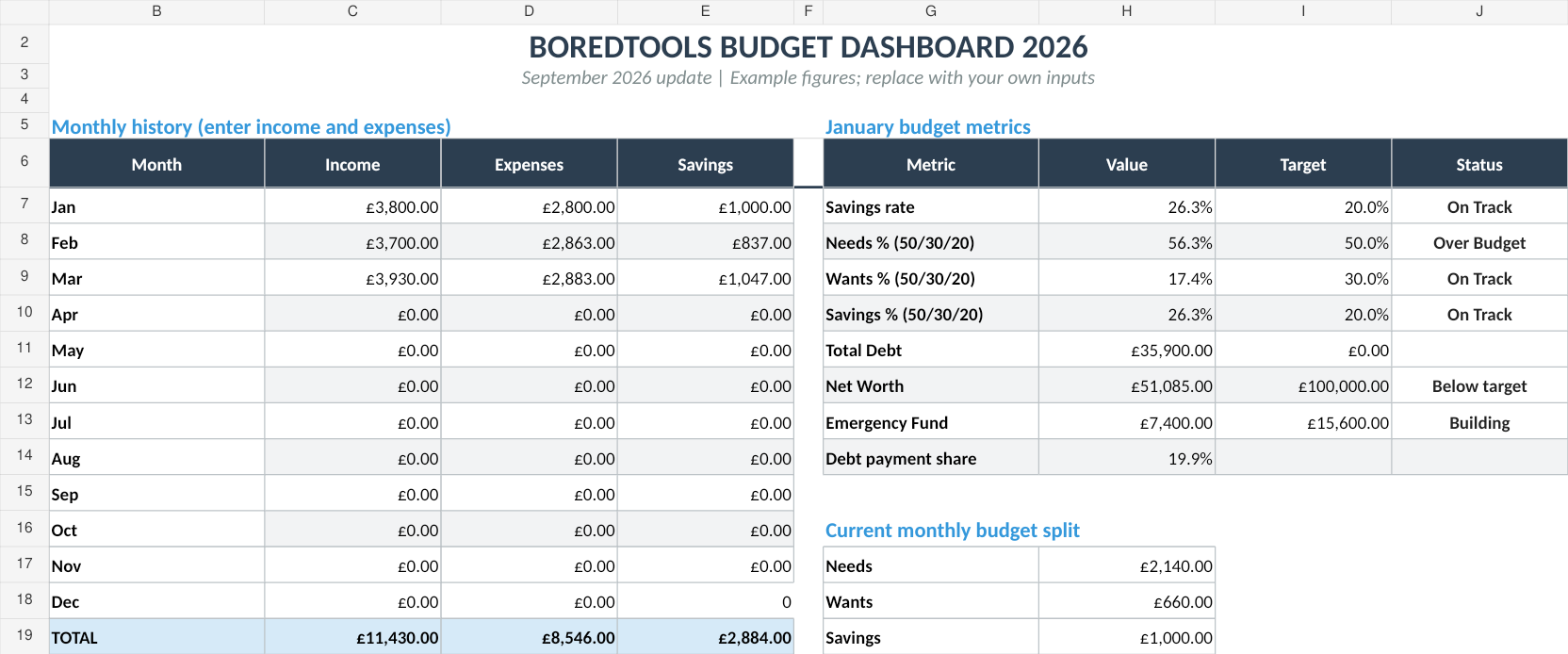
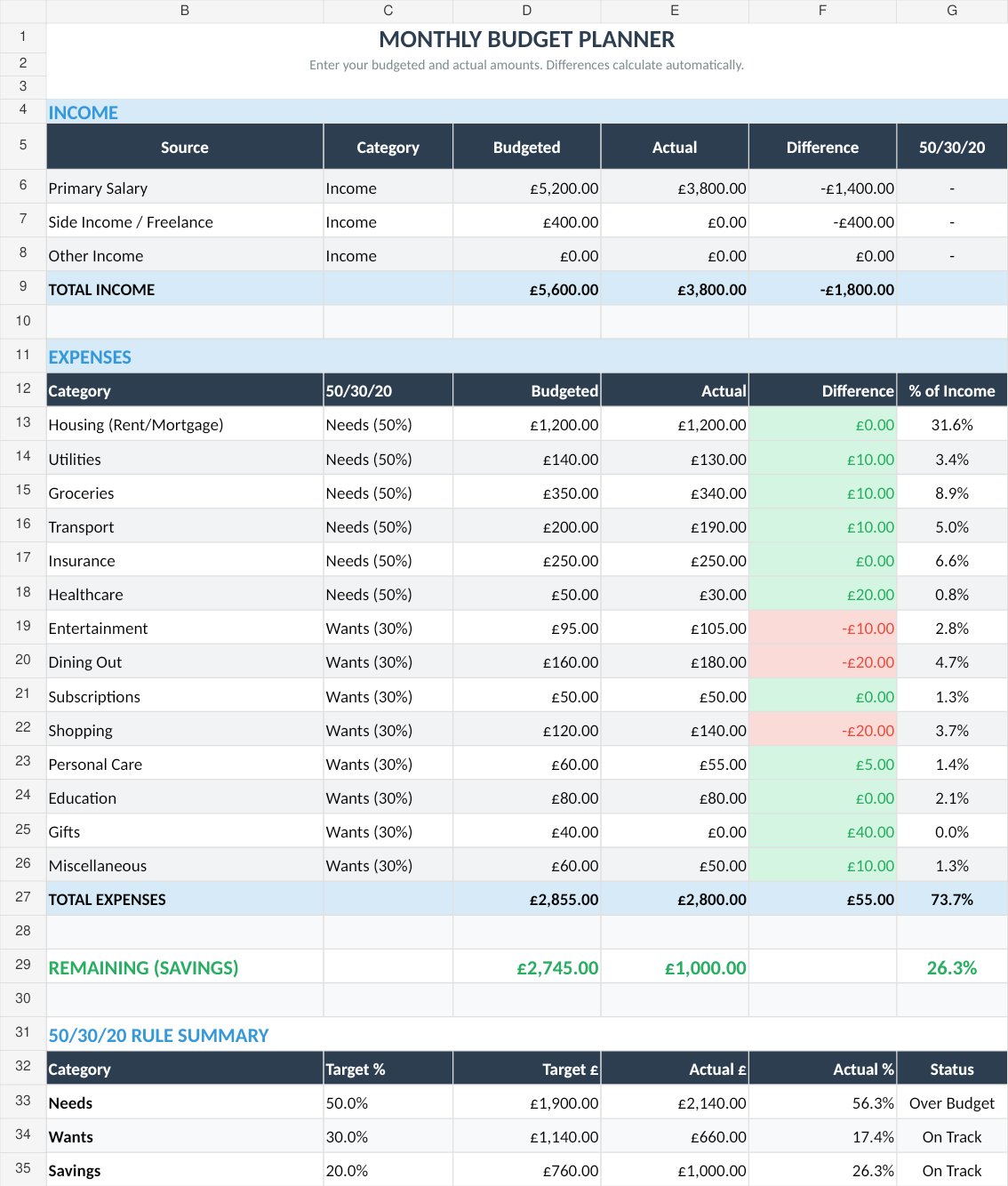
A dashboard like this tracks the 50/30/20 split alongside income and expenses. In retirement, you adapt these ratios to reflect essential spending, discretionary spending, and drawdown rather than saving.
The Retirement Budget Framework
Forget needs vs. Wants. For retirement, a three-tier framework works better.
Essential Spending (Non-Negotiable)
These are the costs you can't cut without fundamentally changing your quality of life:
- Housing (mortgage/rent, council tax, insurance, maintenance)
- Utilities (gas, electric, water, broadband, TV licence)
- Food and household basics
- Healthcare (prescriptions, dental, optician, any private cover)
- Transport (car costs or bus pass)
- Insurance (home, contents, travel, life if still paying)
Target: Cover 100% of this tier from guaranteed income (state pension + defined benefit pension). If essential spending exceeds guaranteed income, that's a red flag that needs addressing before anything else.
Discretionary Spending (Quality of Life)
The things that make retirement enjoyable rather than just survivable:
- Holidays and travel
- Dining out, entertainment, hobbies
- Gifts and charitable giving
- Home improvements
- New clothes beyond basics
- Subscriptions and memberships
Target: Fund from drawdown income + investment returns. This is the flexible layer. In a bad market year, cut discretionary spending temporarily to protect your portfolio.
Legacy and Contingency
Money set aside for things beyond your own spending:
- Emergency fund (12-18 months of essential spending for retirees, not the standard 3-6 months)
- Care cost contingency (average UK care home: around £800-£1,000/week)
- Inheritance goals
- Funeral costs
Target: Ring-fenced. Don't touch this for day-to-day spending.
Inflation-Adjusted Projections
This is the piece most templates miss entirely. A budget that works today won't work in 10 years without accounting for inflation. At 3% annual inflation, your £2,000/month spending becomes £2,688/month in 10 years and £3,612/month in 20. Your template needs a projection tab that shows whether income keeps pace with expenses over a 20-30 year horizon.
Grab the Budget Dashboard 2026 for £7.99 on Sort & Keep → It includes multi-income tracking and net worth monitoring out of the box. Add a drawdown tab and you've got a solid retirement budget system for under a tenner.
Options to compare
1. Pen and Paper
Platform: Notebook and calculator
Price: Free
Who it's for: Retirees who prefer physical tracking
A surprising number of retirees prefer a notebook. Nothing wrong with that for tracking day-to-day spending. The problem: pen and paper can't do inflation projections, drawdown rate calculations, or show whether your money lasts 25 years. You can track what you spent last Tuesday. You can't model whether your portfolio survives a 40% market crash in year 3.
Pros: Simple, no tech barrier, tactile
Cons: No projections, no automatic calculations, impossible to model scenarios
Verdict: Fine for daily expense tracking. Dangerous as your only retirement budgeting tool.
2. Free Spreadsheet Templates
Platform: Google Sheets / Excel
Price: Free
Examples: Our Free Budget Tracker, various templates on Reddit and personal finance forums
Most free templates give you income and expense categories with basic summing. Common problems: single income row, working-age expense categories, no inflation modelling, no drawdown tracking. That said, a free Google Sheet is genuinely good enough if you customise it. The Free Budget Tracker we offer gives you a solid starting structure. You'll need to add retirement-specific rows (pension breakdown, drawdown tracking, healthcare), but the bones are there and it handles multi-category expense tracking well.
Pros: Free, customisable, shareable with a partner or financial adviser
Cons: Requires manual customisation for retirement use, no built-in drawdown or inflation modelling
Verdict: A reasonable starting point if you're comfortable editing spreadsheets. Best combined with a separate drawdown calculator.
3. Paid Budget Spreadsheets
Platform: Google Sheets / Excel
Price: £5-£30 one-time
Example: Budget Dashboard 2026 (£7.99)
UK edition built for British finances. HMRC Self Assessment categories, council tax tracking, National Insurance (Class 2 and Class 4) calculations, ISA allowances, and GBP formatting throughout. US edition included with IRS tax brackets, 401(k) tracking, and USD formatting.
Paid templates tend to be more polished and feature-rich. The Budget Dashboard 2026 includes multi-income tracking, net worth monitoring, and a yearly overview. All of that matters more in retirement than during working years. When you're drawing down, watching your net worth trend is more important than watching your monthly budget.
The net worth tracker. Watch your total financial picture over time rather than just monthly cash flow. For retirees, this trend line matters more than any single month's budget.
You'll still want to add a drawdown rate tracker and inflation projections, but the foundation saves significant setup time compared to building from scratch.
Pros: Multi-income tracking out of the box, net worth monitoring, dashboard views, one-time cost
Cons: Not retirement-specific (needs some customisation), no built-in Guyton-Klinger or similar rules
Verdict: Best balance of price and functionality. Add a drawdown tab and you've got a solid retirement budget system for under £10.
4. Retirement-Specific Software
Platform: Web apps and desktop software
Price: Free to £120/year
Examples: Timeline (UK), Voyant Go, RetireEasy, cFIREsim (free)
This is where things get genuinely retirement-focused. These tools model your entire financial life from now until death (projected, obviously). They account for state pension timing, tax bands, inflation, market volatility (often using Monte Carlo simulations), and withdrawal strategies like the Guyton-Klinger guardrails method.
Timeline is the standout for UK retirees. Used by many IFAs, it models defined benefit pensions, state pension, ISAs, SIPPs, and shows probability of success for different spending levels. It's not cheap, but it answers the question a spreadsheet struggles with: "Will my money last?"
cFIREsim is free and runs historical backtesting against actual market data going back to 1871. It's US-focused, but useful for understanding how different withdrawal rates perform across historical market conditions.
Pros: Purpose-built for retirement, handles complexity spreadsheets can't, scenario modelling
Cons: Expensive (Timeline via adviser only), learning curve, some are US-centric, ongoing subscription costs
Verdict: Worth it if your portfolio sits above £200k and you want genuine peace of mind about longevity risk. Overkill for simpler situations.
5. Financial Adviser Tools (Accessed Through an IFA)
Platform: Adviser-only platforms
Price: Included in adviser fees (typically 0.5-1% of portfolio annually)
Examples: Voyant, Truth, Dynamic Planner, Prestwood
These are the institutional-grade tools financial advisers use. You don't buy them directly. You access them through your adviser. They produce detailed cashflow forecasts, stress-test your portfolio against various scenarios, and generate those glossy retirement income reports.
The quality of output depends heavily on the adviser. The tool is only as good as the assumptions fed into it. We've seen advisers use optimistic 7% growth assumptions that paint a rosy picture, and others use conservative 3.5% real returns that tell a harder truth.
Pros: Most sophisticated modelling available, professionally managed assumptions, regulated advice
Cons: Expensive (adviser fees compound over decades), you don't own or control the tool, quality varies by adviser
Verdict: Makes sense if you have a complex situation. Multiple pensions, a property portfolio, inheritance tax concerns. For straightforward retirement budgets, a good spreadsheet plus a one-off adviser consultation gives you 90% of the value at 10% of the cost.
Features a Budget Template for Retirees Must Have
Whatever tool you pick, make sure it handles these:
Pension Income Tracking (Multiple Sources)
List every income source separately with its own growth rate:
| Source | Monthly | Annual Increase | Notes |
|---|---|---|---|
| State Pension | £915 | Triple lock (~4%) | Starts age 66 |
| DB Pension (employer) | £650 | CPI-linked | Already receiving |
| SIPP Drawdown | £800 | You control | 4% of pot |
| ISA Dividends | £200 | Variable | ~3.5% yield |
| Total | £2,565 |
Drawdown Rate Monitoring
If you're taking income from a SIPP or ISA, track your withdrawal rate each year. A simple formula:
Annual Withdrawal / Portfolio Value at Start of Year = Drawdown Rate
Display this prominently. If it creeps above 4.5-5%, you need to either cut discretionary spending or accept a higher risk of running short. The Guyton-Klinger method adds guardrails: if your drawdown rate rises above a ceiling (say 5.5%), cut spending by 10%. If it drops below a floor (say 3.5%), give yourself a raise. Simple rules. Powerful protection.
NHS and Healthcare Cost Tracking
UK-specific but important. Track:
- Prescription costs (free if 60+, but worth tracking other medical expenses)
- Dental charges (Band 1: £26.80, Band 2: £73.50, Band 3: £319.10 as of 2025)
- Optician (NHS sight test free at 60+, glasses and contacts are not)
- Private health insurance (premiums rise steeply with age. Track year over year)
- Hearing aids, mobility aids, home adaptations
Council Tax (With Discounts)
Council tax is often a retiree's third-largest expense after housing and food. Track it monthly and note:
- Single person discount (25% off)
- Council Tax Reduction (income-based, replaces old Council Tax Benefit)
- Disability reduction (if applicable)
Inflation Adjustment Tab
Build a simple projection showing your budget at current prices versus inflation-adjusted prices over 5, 10, 15, 20, and 25 years. Use 3% as a baseline and 5% as a stress test. This single tab will tell you more about your financial future than months of expense tracking.
Emergency Fund for Care Costs
The average stay in a UK care home runs about 2.5 years. At current rates, that's roughly £100,000-£130,000. You might never need it. But if you do, and you haven't planned for it, the cost will consume most of a moderate estate. Even setting aside £500/month into a ring-fenced care contingency fund changes the picture significantly.
Related Reads
- Budget Dashboard 2026: Full Feature Walkthrough
- FIRE Spreadsheet: Calculate Your Financial Independence Number
- How to Track Your Net Worth in Google Sheets
- Best Budget Spreadsheet Templates in 2026
Final Recommendation
For most retirees, a layered approach works best.
Start with a solid spreadsheet for month-to-month budgeting. The Budget Dashboard 2026 handles multi-income tracking and net worth monitoring out of the box. Add rows for each pension source, a drawdown rate calculator, and an inflation projection tab. If you want to start simpler, grab the Free Budget Tracker and build from there.
Run a one-off longevity check using cFIREsim (free) or pay for a single session with a fee-only financial adviser who uses Timeline or Voyant. The question isn't "what did I spend this month?" It's "will my money outlast me?" A spreadsheet can't answer that reliably. A Monte Carlo simulation can.
Review quarterly, not monthly. Working-age budgets benefit from monthly check-ins. Retirement budgets work better with quarterly reviews because income is more predictable and spending patterns shift slowly. Each quarter, check: Is my drawdown rate where I want it? Has anything changed with pension income? Do inflation projections still look comfortable?
The worst retirement budget is no budget at all. The second worst is a working-age template that gives you false confidence because it doesn't account for inflation, drawdown, or the fact that income won't go up next year. Get the right framework and the spreadsheet does the worrying so you don't have to.
Get the Budget Dashboard 2026 for £7.99 on Sort & Keep →
Get free spreadsheet templates and updates. New templates, feature updates, and practical guides delivered to your inbox. No spam, unsubscribe anytime.
Subscribe free → | Already have a template? Download the free budget tracker or free meal planner. No email required.
Choose the right next step
Need a simple budget tracker spreadsheet? Start with the Free Budget Tracker. Use Budget Dashboard 2026 when you want budgets, debt, savings and net worth in one workbook. Choose the Complete Collection when several parts of life admin need sorting.