Budget Template for Students: 5 Approaches We Actually Tested
Budget template for students with irregular loan income. We tested 5 options to find what actually works. Find the right fit.

From Sort & Keep, the maker of the linked templates. Our current product prices update with your selected currency. Worked examples and third-party prices keep their stated currency and date.
Finding a budget template for students that actually works is harder than it should be. Here's the situation most students are actually in: you get a maintenance loan three times a year in chunks that feel enormous for about 48 hours, rent eats half of it immediately, and then you're stretching what's left across 13 weeks while pretending the overdraft doesn't exist.
Standard budgeting advice doesn't land because it assumes a steady monthly paycheck. Students don't have that. You might work 20 hours a week during term and 40 during summer. Your biggest "income" arrives in three lump sums timed to the academic calendar. Your expenses swing wildly between term-time (rent, food, going out) and holidays (maybe no rent, but travel, maybe more work).
From a notebook to paid apps. And tracked which ones actually survived past freshers' week. Here are the main considerations.
Get the Budget Dashboard 2026 for £7.99 on Sort & Keep →
Why Most Budget Templates Fail Students
Before we get into tools, here's why generic budget templates fail students. A standard monthly budget assumes:
- Regular income. You get paid the same amount on the same date. Students don't.
- Consistent expenses. Your rent and bills stay roughly the same. Students might pay rent for 10 months and nothing for 2.
- One financial rhythm. Everything revolves around a monthly cycle. Students operate on term dates, loan drop dates, and exam schedules.
A good budget template for students needs to handle three specific things:
- Lump-sum loan income divided across term weeks, not months.
- Variable part-time work that changes between term and holidays.
- Two spending modes. Term-time brings high fixed costs and low free time to spend. Holidays flip that.
If your budgeting tool can't handle those three realities, you'll abandon it by week four. With that out of the way, here are the five approaches.
1. Pen and Paper. The Analog Method
Platform: A notebook. Literally any notebook.
Price: Free (or whatever you paid for the notebook)
Best for: People who hate screens after a day of lectures
Write your loan amount at the top of the page. Subtract rent for the term. Divide what's left by the number of weeks. That's your weekly budget. Log what you spend each day.
Pros:
- Zero setup time
- No app permissions, no accounts, no sync issues
- Physically writing a number makes overspending feel more real
- Works when your phone is dead
Cons:
- No automatic calculations. You're doing maths by hand.
- No charts, no trends, no "you've spent 80% of your food budget" warnings
- Easy to lose or forget
- Can't search past entries or spot patterns over months
Verdict: Surprisingly effective for the first few weeks. The problem is longevity. Most people we talked to kept it up for 2-3 weeks before the notebook stayed in the drawer. If you're disciplined enough to maintain it, it genuinely works. There's research showing that handwriting expenses increases awareness more than typing them. Just don't expect to spot spending patterns six months later.
2. Banking Apps (Monzo, Starling, Revolut)
Platform: iOS / Android
Price: Free
Best for: Students who want automatic tracking with zero effort
Modern banking apps have gotten genuinely good at budgeting. Monzo lets you set monthly spending targets and splits your spending into categories automatically. Starling has Spaces for ring-fencing money. Revolut has budget pots and round-up savings.
Pros:
- Transactions categorize themselves. No manual logging.
- Real-time notifications on every purchase
- "Pots" or "Spaces" let you ring-fence rent money so you can't accidentally spend it
- Already on your phone; no extra app to open
Cons:
- Locked to one bank. If your income hits a different account, it won't track it.
- Categories are often wrong (every card payment at Tesco Express is "groceries" even when you bought a phone charger)
- Monthly budget cycles don't matches term dates or loan drop dates
- No way to plan ahead across a whole term. Only shows current month.
- Limited export options if you want to do deeper analysis
Verdict: Best as a day-to-day spending tracker, not a term-level planner. We'd recommend using a banking app for real-time awareness and a spreadsheet for the bigger picture. If you're on Monzo, set your salary date to your loan drop date. It'll at least reset your budget cycle at the right time.
3. Free Google Sheets Budget Templates for Students
Platform: Google Sheets (works on any device with a browser)
Price: Free
Best for: Students who want full control without paying anything
Google Sheets has built-in budget templates (File > New > From template gallery), but they're designed for full-time workers with monthly salaries. The better option is a student-focused template that works in weeks and handles irregular income.
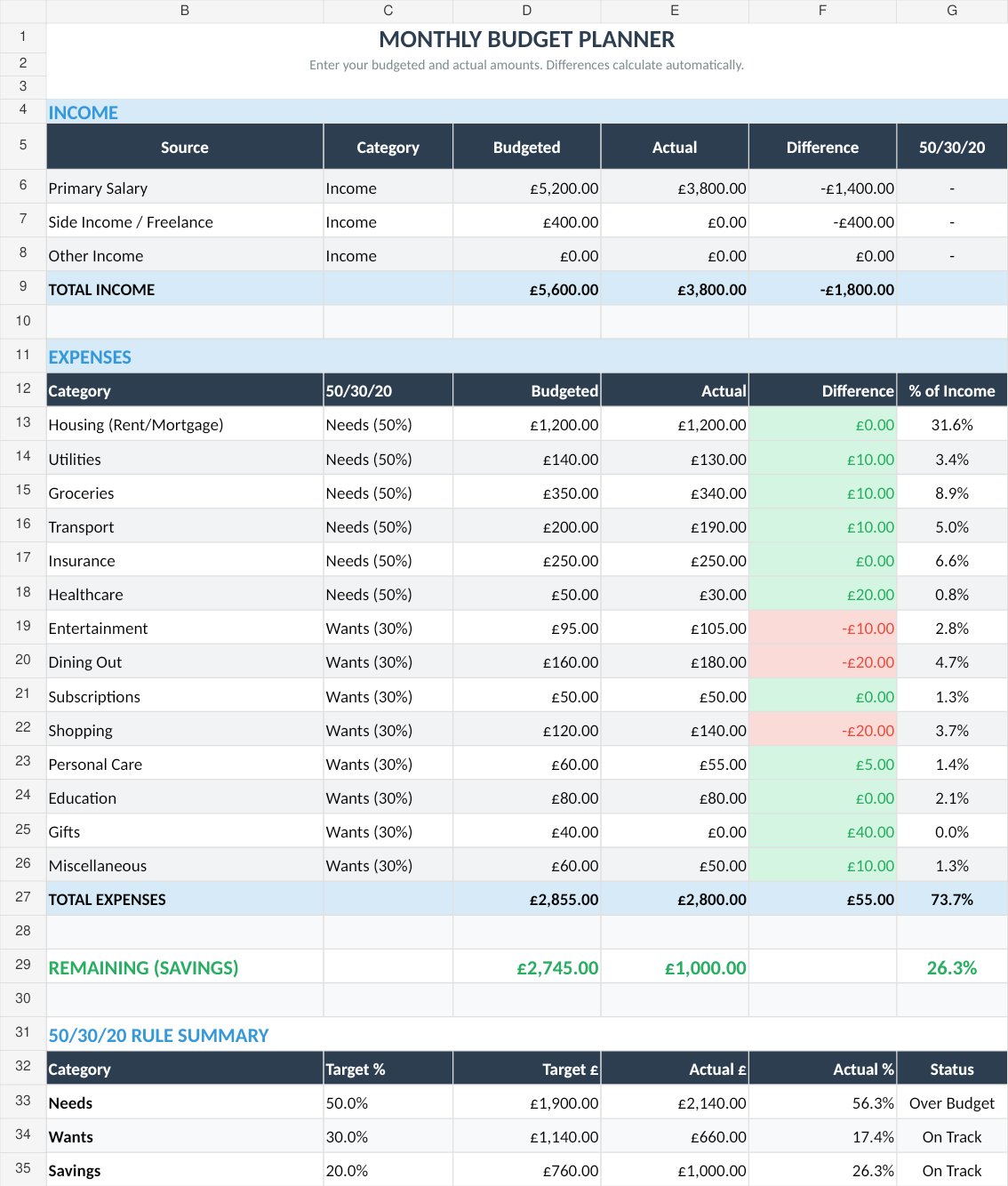
Our Free Budget Tracker is a good starting point here. It's a Google Sheets template that tracks income, expenses, and categories with no cost and no email signup. You can adapt it to work on a weekly or termly basis by adjusting the income section to reflect loan drops and part-time work.
The monthly budget view. Simple enough to set up in five minutes, flexible enough to adapt for term dates and loan drops.
Pros:
- Completely free
- You own the data. It's just a spreadsheet in your Google Drive.
- Customizable: add columns for term weeks, adjust categories for student life
- Works on your phone through the Google Sheets app
- Easy to share with housemates for split expense tracking
Cons:
- Requires manual data entry (no bank connection)
- Generic templates need tweaking to fit student schedules
- If you're not comfortable with basic spreadsheet formulas, there's a learning curve
- The mobile Sheets experience is functional but not pleasant
Verdict: The best balance of free, flexible, and functional. A spreadsheet won't auto-import your transactions, but that 30-second daily entry actually helps you stay aware of where money goes. If you use the 50/30/20 rule as your framework, a simple sheet is all you need to run it. We recommend this as the starting point for most students.
Upgrade to Budget Dashboard 2026 → £7.99 on Sort & Keep
4. Paid Spreadsheet Templates
Platform: Google Sheets or Excel
Price: $5-$30 one-time
Best for: Students who want dashboards and visualizations without a subscription
Paid templates add what free ones lack: charts, dashboards, debt tracking, savings goal progress, and proper formatting that doesn't look like a homework assignment.
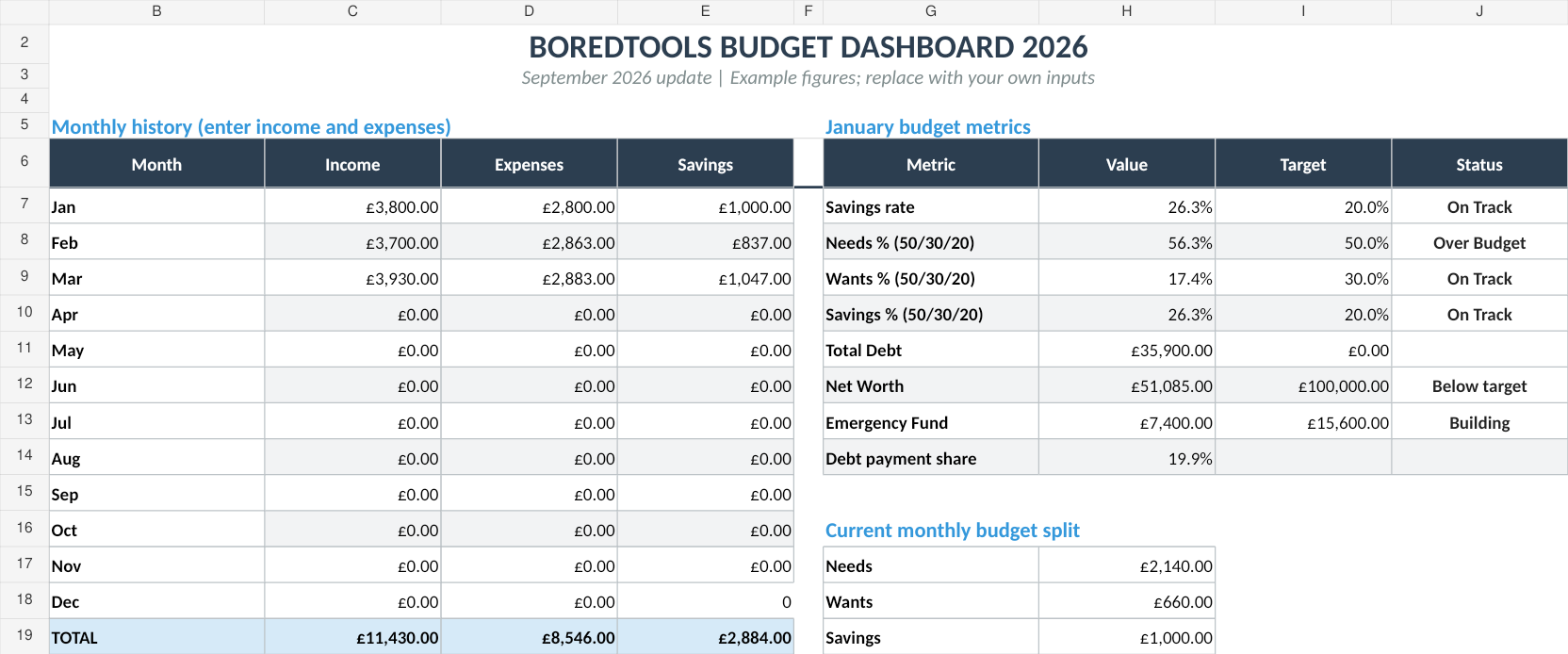
The Budget Dashboard 2026 (£7.99) is what we'd recommend if you want something more capable. It includes expense categorization, visual dashboards, and savings tracking. Useful if you're also trying to pay down a student overdraft or save for summer travel. If you're graduating soon and thinking about life after uni, the same template carries over well. Our new graduates budget guide covers how to adapt it for that transition.
UK edition built for British finances. HMRC Self Assessment categories, council tax tracking, National Insurance (Class 2 and Class 4) calculations, ISA allowances, and GBP formatting throughout. US edition included with IRS tax brackets, 401(k) tracking, and USD formatting.
The full dashboard view. Income vs expenses, savings rate, and a 50/30/20 breakdown all on one screen.
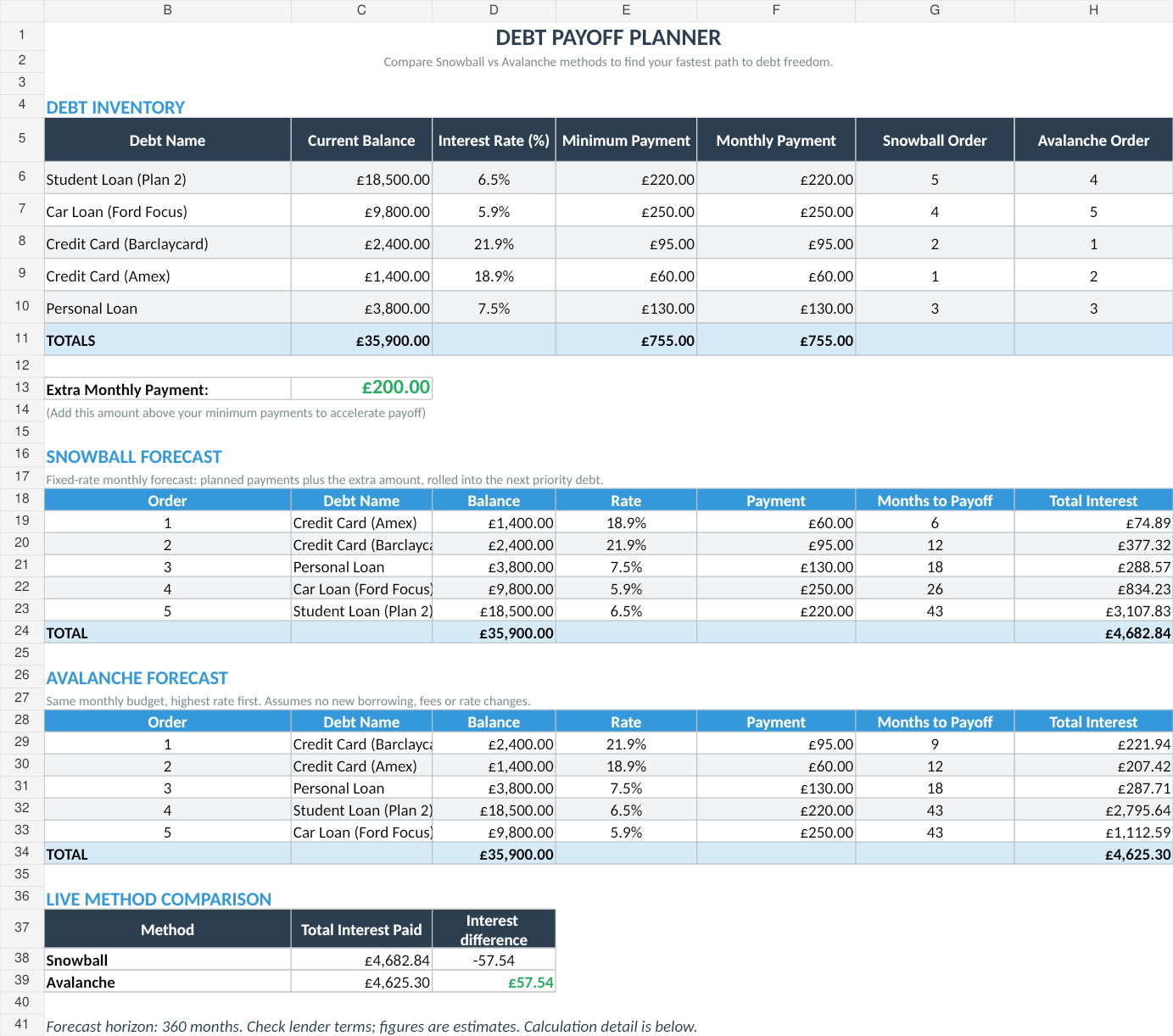
For students with student loan debt they want to model repayment on, our Debt Payoff Calculator covers the snowball and avalanche methods side-by-side.
Pros:
- Pre-built dashboards that actually look good
- Savings goals, debt tracking, and net worth monitoring in one place
- One-time cost, not a subscription. You pay once and own it.
- Charts and visual feedback keep you motivated
- All the flexibility of a spreadsheet (you can still customize everything)
Cons:
- Still requires manual data entry
- £8-30 is real money on a student budget
- Some paid templates are over-engineered. 15 tabs when you need 3.
- You're paying for formatting and formulas you could build yourself, if you had the time
Verdict: Worth it if you know you'll actually use it. Seeing charts move as you log expenses is genuinely motivating. Not worth it if you'll download it, look at it once, and never open it again. Be honest with yourself about which category you fall into.
5. Full Budgeting Apps (YNAB, Goodbudget, Emma)
Platform: iOS / Android / Web
Price: YNAB $14.99/month ($99/year), Goodbudget free tier available, Emma free tier available
Best for: Students who want a dedicated system and will commit to it
YNAB (You Need a Budget) is the gold standard for intentional budgeting. Its philosophy of "give every dollar a job" works brilliantly for lump-sum loan income because it forces you to allocate the whole amount immediately. Goodbudget uses the envelope method digitally. Emma aggregates multiple accounts and gives you a spending overview.
Pros:
- YNAB's "assign every pound" method fits loan drops perfectly
- Mobile apps are polished and fast. Easy to log on the go.
- Bank syncing available (YNAB, Emma) so you don't have to enter everything manually
- Built-in goal tracking for savings targets
- Active communities with student-specific advice
Cons:
- YNAB at $14.99/month is steep for a student. That's $180/year.
- YNAB offers a free year for students (with a .ac.uk or .edu email), but you need to remember to apply
- Goodbudget's free tier limits you to 10 envelopes and one account
- Emma pushes premium features aggressively
- You're locked into their system. If they raise prices or shut down, your data isn't easily portable.
Verdict: If you can get YNAB's free student year, try it. The methodology is excellent for irregular income. If you can't justify the cost after the free year ends, take what you learned about zero-based budgeting and apply it in a spreadsheet. Don't pay $15/month for something Google Sheets does for free unless the automation saves you real time.
What a Budget Template for Students Actually Needs
After testing all five approaches, here are the features that separate a useful student budget from a generic one:
Irregular Income Handling
Your income isn't "salary on the 25th." It's a loan drop in September, January, and April, plus maybe 10-15 hours of part-time work at variable hours. Your budget tool needs a way to enter lump sums and divide them across weeks. Not just track monthly income.
What works: A spreadsheet row for each income source (loan, job, gifts, bursary) with a "period covered" column. Divide the loan by term weeks to get your actual weekly budget.
Term Date Awareness
Academic years run September to June. Terms are roughly 10-13 weeks each. Summer is a different financial universe: possibly no rent, more work hours, different spending patterns. Your budget should reset by term, not by calendar month.
What works: Separate tabs or sections for each term, plus a summer tab. This also makes it easy to compare: did you spend more in term 2 than term 1?
Loan Drop Date Planning
The single most important date in a student's financial calendar. If you spend 40% of your loan in the first two weeks (it happens more than anyone admits), you're eating rice for the remaining eleven. Your budget needs to make this visible.
What works: A simple countdown: "loan drop: £X, allocated: £Y, unallocated: £Z." If unallocated hits zero, you've planned the whole amount. If it's still positive, you haven't finished budgeting.
Savings Goals for Summer and Beyond
A summer trip, a rental deposit for second year, a buffer so you're not broke in September. Students need goal tracking tied to specific dates.
What works: A savings goal tracker with a target amount, target date, and current balance. Even a basic one motivates saving. The Budget Dashboard 2026 has this built in if you don't want to build it yourself. And it's the same tool you'll find covered in detail in our Budget Dashboard 2026 full review.
Split Expenses with Housemates
If you're in a shared house, you're splitting bills, groceries, and probably the occasional takeaway. Your budget tool needs a way to record shared costs and track who owes what.
What works: A shared Google Sheet that all housemates can edit, or a dedicated app like Splitwise alongside your budget. Keep it simple. Don't try to build a full expense-splitting system inside your budget spreadsheet.
Our Recommendation
For most students, here's the setup that actually works:
Start with a free spreadsheet. Grab the Free Budget Tracker and customize it for your term dates. Enter your loan amount, subtract rent, divide by weeks. That's your baseline.
Use your banking app for daily awareness. Let Monzo or Starling auto-categorize your spending. Check it when you're bored on the bus. Don't obsess over it.
Do a 10-minute weekly review. Every Sunday, log anything your banking app missed into the spreadsheet. Check if you're on track for the term. Adjust next week's spending if needed.
Upgrade if and when you need to. If the free template feels limiting after a term because you want charts, savings goals, and debt tracking, the Budget Dashboard 2026 is the move. If you want a full system and can get the free student year, try YNAB.
The tool matters less than the habit. A notebook you actually use beats a $15/month app you opened twice. Start simple, stay consistent, and upgrade only when the simple version genuinely isn't enough.
For a broader comparison of budgeting tools beyond the student-specific options here, see our full roundup of the best budget spreadsheet templates in 2026.
Related Reads
- The 50/30/20 Budget Rule: Free Template
- Best Budget Spreadsheet Templates in 2026
- Debt Payoff Calculator: Snowball vs Avalanche Method
Final Thought
The biggest financial mistake students make isn't spending too much on nights out. It's not knowing how much they can spend on nights out. A budget doesn't mean deprivation. It means knowing you've got £40 left this week for fun, and spending it without guilt because rent and food are already covered.
Pick one of the five approaches above. Try it for one term. If it survives freshers' week, you're onto something.
Get free spreadsheet templates and updates. New templates, feature updates, and practical guides delivered to your inbox. No spam, unsubscribe anytime.
Subscribe free → | Already have a template? Download the free budget tracker or free meal planner. No email required.
Grab the Budget Dashboard 2026 → £7.99 on Sort & Keep
Choose the right next step
Need a simple budget tracker spreadsheet? Start with the Free Budget Tracker. Use Budget Dashboard 2026 when you want budgets, debt, savings and net worth in one workbook. Choose the Complete Collection when several parts of life admin need sorting.