Budget Template for Small Business Owners: Personal vs Business
Budget template for small business owners. Separate personal and business finances with tax set-asides and VAT tracking. Get the template.

From Sort & Keep, the maker of the linked templates. Our current product prices update with your selected currency. Worked examples and third-party prices keep their stated currency and date.
Twenty-nine percent of small businesses fail because they run out of cash. Not because the product was bad. Not because the market wasn't there. Because the money ran out. And nobody saw it coming until the account was empty.
Here's what makes that statistic worse: most of those cash flow problems don't start with a bad quarter or a lost client. They start with an owner who paid their mortgage from the business account, covered a supplier invoice from personal savings, and lost track of which money belonged where. One blurred line becomes two, then ten, and six months later you're staring at a bank balance that technically has money in it but practically belongs to HMRC.
If you're looking for a budget template for small business owners, this is the first thing to understand: you don't need one template. You need two. One for the business and one for you. With a clean, traceable line between them.
Why You Need a Budget Template for Small Business Owners
Most small business owners fall into one of two camps.
Camp 1: The personal budgeter. You've got a spreadsheet or an app tracking your household spending. Maybe the 50/30/20 rule or something similar. It works for the personal side, but your business income shows up as one lump. "owner's draw: £3,800". With no visibility into whether the business can actually sustain that number. You're budgeting your personal life against a number you're guessing at.
Camp 2: The business bookkeeper. You've got Xero or QuickBooks or a shoebox of receipts. You know your revenue, your expenses, maybe even your profit margin. But your personal finances are a black hole. You take what you need from the business, hope it's enough, and deal with the consequences later.
Neither approach works on its own because they each ignore half the picture. Your business P&L doesn't tell you whether you can afford a holiday. Your personal budget doesn't tell you whether the business can afford to give you a raise. And when tax time arrives, the tangled mess of transfers between personal and business accounts turns a straightforward Self Assessment into an archaeological dig.
The answer isn't a better version of either tool. It's a framework that connects them.
The Dual-Budget Framework
The concept is simple, even if most people skip it. Your money should flow in one direction through four stages:
Stage 1. Business P&L
All revenue comes into the business. All business expenses go out. What's left is your gross profit. This is not your money yet. This is the business's money.
Track it properly: revenue by client or product line, expenses by category (software, supplies, marketing, subcontractors, office costs, insurance). Know your profit margin. For most UK small businesses, a healthy net margin sits between 10% and 20% depending on the industry. If yours is below 10%, that's a business problem, not a budgeting problem.
Stage 2. Owner's Draw or Salary
From the business profit, you pay yourself. If you're a sole trader, this is drawings. If you're running a limited company, this is salary plus dividends. The amount should be a deliberate decision, not "whatever's left" or "whatever I need this month."
A reasonable starting point: pay yourself 50-60% of average monthly net profit. Keep the rest in the business for tax, reinvestment, and a cash buffer. If your business nets £5,000/month on average, your owner's draw might be £2,500-£3,000. That's a real number you can build a personal budget around.
Stage 3. Personal Budget
Now. And only now. You budget like a normal person. Your owner's draw is your "salary." Apply whatever personal budgeting method works for you. We like the priority-tier approach from our freelancer budget guide, but the 50/30/20 rule works fine if your draw is consistent month to month.
The critical rule: personal expenses never touch the business account. Business expenses never come from your personal card. One direction. No exceptions.
Stage 4. Tax Reserves
This is where most small business owners get burned. Corporation Tax (25% on profits over £250,000, 19-25% marginal relief between £50,000 and £250,000), Self Assessment payments on account, VAT (if you're registered), Class 2 and Class 4 National Insurance. These obligations are real, they're coming, and they need a dedicated pot.
Set aside 25-30% of business net profit into a separate tax savings account every single month. Not at year-end. Not when the bill arrives. Monthly. If you overshoot, you get a refund. If you undershoot, you get a payment demand you can't cover. There's an obvious correct answer here.
Budget Templates and Tools for Small Business Owners: Options to compare
We evaluated five approaches, specifically through the lens of a small business owner who needs both business tracking and personal budgeting with a clean separation between the two.
1. Separate Spreadsheets (DIY)
Platform: Google Sheets or Excel
Price: Free
Best for: Owners who want total control and are comfortable building formulas
The simplest approach: one spreadsheet for the business, one for personal. Business sheet tracks revenue, expenses, profit, tax set-aside, and owner's draw. Personal sheet takes the draw amount as income and runs a standard budget.
Pros:
- Free
- Complete flexibility
- No learning curve beyond basic spreadsheet skills
- Your data stays entirely in your control
Cons:
- You're building and maintaining two spreadsheets
- No automatic connection between them. Updating the draw in one doesn't update income in the other
- Formulas break easily when you add rows or change structure
- No VAT tracking, no tax deadline reminders, no business expense categorisation beyond what you build yourself
Verdict: Works if you're disciplined and your business is simple. Falls apart quickly once you're dealing with multiple revenue streams, VAT, or more than a dozen expense categories. If you want a free starting point for the personal side, grab our free budget tracker (Sort & Keep) and pair it with a basic P&L sheet.
2. Xero
Platform: Web app + mobile
Price: From £15/month (Starter) to £47/month (Premium)
Best for: Limited companies and VAT-registered businesses that need proper accounting
Xero is a solid cloud accounting platform. Bank feeds, invoicing, expense claims, payroll, VAT returns, and multi-currency support. It integrates with over 1,000 apps and most UK accountants are comfortable working in it.
Pros:
- Automatic bank feeds from all major UK banks
- Real-time profit and loss, balance sheet, and cash flow reports
- VAT return filing directly to HMRC (MTD compliant)
- Payroll add-on handles PAYE if you have employees
- Excellent mobile app for receipt capture
Cons:
- £15-47/month is a real ongoing cost. £180-564/year
- It's an accounting tool, not a budgeting tool. No personal finance features whatsoever
- Steep learning curve if you're not accounting-literate
- Starter plan limits you to 20 invoices/month, which is tight for some businesses
- No dividend tracking on cheaper plans
Verdict: If you're VAT-registered or running a limited company with employees, Xero earns its subscription. But it handles Stage 1 of the framework only. You still need something separate for personal budgeting. Many small business owners pay for Xero and then have zero visibility into whether their personal spending is sustainable.
3. FreeAgent
Platform: Web app + mobile
Price: £24/month (free through NatWest, Mettle, and some other UK banks)
Best for: UK sole traders and small limited companies
FreeAgent is the UK-focused alternative to Xero. Real-time tax calculations, Self Assessment filing, and Corporation Tax estimates are built in. It's particularly strong for sole traders and single-director limited companies.
Pros:
- Real-time Self Assessment and Corporation Tax liability calculation
- MTD for Income Tax and VAT compliant
- Automatic bank feeds
- Dividend and director's loan tracking for limited companies
- Genuinely free through several UK banks. Not a trial, permanently free
Cons:
- £24/month if you don't qualify for the free banking offer
- Weaker than Xero for multi-currency and complex business structures
- Still an accounting tool. No personal budget features
- Interface feels dated compared to Xero
- Limited integrations outside the UK market
Verdict: For UK sole traders, FreeAgent is hard to beat. Especially at the free-through-your-bank price point. The real-time tax calculations alone save hours of guesswork. Same limitation as Xero though: it handles the business side beautifully and the personal side not at all.
4. QuickBooks Self-Employed
Platform: Web app + mobile
Price: From £6/month (Simple Start) to £32/month (Plus)
Best for: Self-employed owners who want accounting and basic tax separation
QuickBooks sits between a full accounting platform and a simplified bookkeeping tool. The Self-Employed tier is specifically designed for sole traders and includes automatic expense categorisation, mileage tracking, and quarterly tax estimates.
Pros:
- Cheaper entry point than Xero or FreeAgent (£6/month)
- Automatic expense categorisation using bank feed data
- Built-in mileage tracker (useful for business vehicle claims)
- Quarterly tax estimate feature
- Widely used. Easy to find an accountant who works with it
Cons:
- The £6/month tier is very limited. Most businesses need the £15+ Essentials plan
- UK tax support is less sophisticated than FreeAgent's
- No personal budgeting features
- The interface can be confusing. Too many menus, too many upsells
- Self-Employed tier doesn't support limited companies
Verdict: A decent middle ground on price, but it doesn't excel at any one thing the way FreeAgent handles UK tax or Xero handles complex accounting. Still solves only the business half of the equation.
5. Freelance Command Center + Budget Dashboard (Combined)
Platform: Google Sheets
Price: $14.99 + £7.99 one-time ($22.98 total)
Best for: Small business owners who want business and personal budgeting in connected spreadsheets with no monthly fee
Full disclosure: we built both of these. Here's why the combination makes sense for this specific problem.
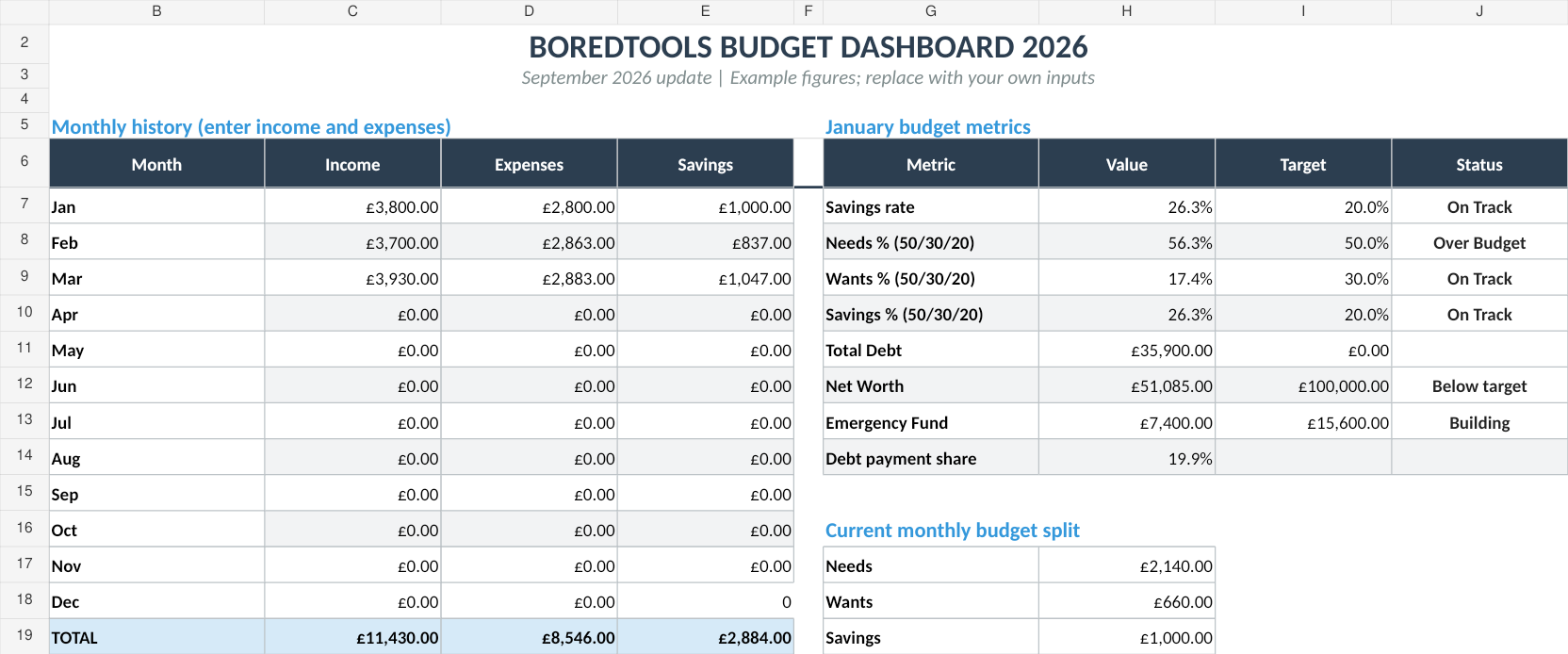
The Freelance Command Center handles Stages 1 and 2 of the framework. Business revenue tracking, client management, expense categorisation, tax set-aside calculations, and owner's draw planning. The Budget Dashboard (Sort & Keep) handles Stages 3 and 4. Personal budgeting, savings goals, debt tracking, and net worth monitoring.
UK edition built for British finances. HMRC Self Assessment categories, council tax tracking, National Insurance (Class 2 and Class 4) calculations, ISA allowances, and GBP formatting throughout. US edition included with IRS tax brackets, 401(k) tracking, and USD formatting.
Together, they create the full pipeline: business profit flows into an owner's draw, the draw flows into your personal budget, and tax reserves are tracked separately on the business side.
Pros:
- Both sides of the dual-budget framework in two connected spreadsheets
- Business: client tracking, income/expense log, tax estimator, profit margin dashboard
- Personal: monthly budget, savings goals, debt payoff tracker, net worth tracker
- $22.98 total, no recurring fees. Cheaper than two months of Xero
- Google Sheets means access from any device, no software to install
- Full control over your data
Cons:
- Manual data entry. No bank feeds
- Google Sheets only (no Excel version currently)
- Not a replacement for formal accounting at year-end. You'll still need to file properly
- Two separate sheets, not one unified tool
Verdict: This is the combination we actually use and recommend for small business owners earning under £100k who want visibility into both their business health and personal financial health without paying monthly software fees. The Freelance Command Center handles everything on the business side, and the Budget Dashboard handles everything personal. Get the Freelance Command Center (£14.99) | Also on Sort & Keep | Get the Budget Dashboard (£7.99) | Also on Sort & Keep
Features a Budget Template for Small Business Owners Actually Needs
Beyond basic income and expense tracking, here's what separates a useful small business budget from a generic one:
VAT threshold tracker. The current UK VAT registration threshold is £90,000 in rolling 12-month taxable turnover. Once you cross it, you must register. And suddenly 20% of every invoice belongs to HMRC. Your budget template should track your rolling 12-month revenue and alert you when you're approaching the threshold. Getting surprised by mandatory VAT registration mid-year can destroy your cash flow projections overnight.
Corporation Tax vs Self Assessment comparison. If you're a sole trader earning above £40,000-50,000 in profit, it may be more tax-efficient to incorporate as a limited company. Your budget should model both scenarios: sole trader (Income Tax + Class 4 NI on all profits) versus limited company (Corporation Tax on profits + Income Tax on salary and dividends). The crossover point depends on your specific numbers, but having the comparison in front of you makes the conversation with your accountant far more productive.
Dividend vs salary calculator. For limited company directors, the most tax-efficient pay structure is typically a low salary (at or just above the NI Secondary Threshold. £9,100 for 2025/26) plus dividends from remaining profits. Your budget should model the tax implications: salary has employer's NI (13.8%) and employee's NI, while dividends have no NI but are taxed at 8.75% (basic), 33.75% (higher), or 39.35% (additional rate) above the £500 dividend allowance. Getting this split right can save £3,000-5,000/year compared to taking everything as salary.
Business expense categorisation. HMRC allows deductions for allowable business expenses, but only if you can categorise and evidence them. Your template should separate: office costs, travel, staff costs, marketing, professional services, insurance, stock/materials, and equipment (capital allowances). This isn't just bookkeeping. Every properly categorised expense reduces your tax bill.
Quarterly tax set-aside. If your Self Assessment bill exceeds £1,000, HMRC requires payments on account. Two advance payments toward next year's tax, due 31 January and 31 July. Each payment is 50% of your previous year's bill. Your budget needs to anticipate these dates and amounts, not just your annual liability.
Personal vs business vehicle tracker. If you use a vehicle for both personal and business purposes, you need to track the split. You can claim 45p per mile for the first 10,000 business miles and 25p thereafter (simplified expenses), or track actual costs and claim the business percentage. Either way, your budget needs a mileage log or cost allocation to support the claim.
Price Comparison
| Tool | Price | Business P&L | Personal Budget | Tax Calc | VAT | One-Time Cost |
|---|---|---|---|---|---|---|
| DIY Spreadsheets | Free | Manual | Manual | Manual | No | Yes |
| Xero | £15-47/month | Yes | No | Limited | Yes | No |
| FreeAgent | £24/month (or free) | Yes | No | Yes (UK) | Yes | No |
| QuickBooks | £6-32/month | Yes | No | Basic | Yes | No |
| FCC + Budget Dashboard | $22.98 total | Yes | Yes | Yes | No | Yes |
So What Should You Actually Use?
Here's our honest recommendation based on where you are:
"I'm a sole trader earning under £50k and I want to keep it simple." Start with the Freelance Command Center (Sort & Keep) for business tracking and the free budget tracker (Sort & Keep) for personal spending. Upgrade to the Budget Dashboard (Sort & Keep) when you want savings goals and net worth tracking.
"I'm VAT-registered or running a limited company." You need proper accounting software. FreeAgent (especially if free through your bank) or Xero. But pair it with the Budget Dashboard for personal budgeting. The accounting software won't help you there.
"I'm approaching the VAT threshold and need to plan." Get your accounting sorted with FreeAgent or Xero now, before you cross £90,000. Use the Freelance Command Center to model whether incorporation makes sense. Use the Budget Dashboard to figure out what owner's draw you actually need to live on.
"I just need to stop mixing personal and business money." Open a separate business bank account today. That's step one. No template fixes the problem if all the money flows through one account. Then set up the dual-budget framework: Freelance Command Center for business, Budget Dashboard for personal, clean transfers between them.
"I want to understand budgeting basics first." Read our best budget spreadsheet templates for 2026 roundup. Get comfortable with personal budgeting before adding business complexity on top.
The Bottom Line
The number one financial mistake small business owners make isn't overspending or undercharging. It's failing to separate personal and business finances clearly enough to make good decisions about either one.
When the money is mixed, you can't answer the two questions that matter most. Can the business sustain itself? And can you sustain yourself on what the business pays you? A single template can't answer both. You need one view for the business and one for your personal life, connected by a deliberate, trackable owner's draw.
Whether you build that system in accounting software, spreadsheets, or a combination of both, the framework is the same: business revenue in, business expenses out, owner's draw across, personal budget funded. Keep the line clean, set tax aside monthly, and review both sides every week. That's the entire system. It's not complicated. It just requires the discipline to keep two pots of money from becoming one murky puddle.
The Freelance Command Center handles the business side. The Budget Dashboard (Sort & Keep) handles the personal side. Together, they cost less than a single month of most accounting software and give you visibility into the full picture. That's the setup we'd recommend to any small business owner who wants to stop guessing and start knowing.
Related Reads
- Freelance Command Center: The Full Breakdown
- Budget Template for Freelancers: Managing Irregular Income
- Budget Template for Gig Workers: Multiple Income Streams & Platform Fees
- Budget Template for Teachers: Term-Time Budgeting & Pension
- Best Budget Spreadsheet Templates in 2026
Get free spreadsheet templates and updates. New templates, feature updates, and practical guides delivered to your inbox. No spam, unsubscribe anytime.
Subscribe free → | Already have a template? Download the free budget tracker or free meal planner. No email required.
Choose the right next step
Need a simple budget tracker spreadsheet? Start with the Free Budget Tracker. Use Budget Dashboard 2026 when you want budgets, debt, savings and net worth in one workbook. Choose the Complete Collection when several parts of life admin need sorting.