Budget Template for Teachers: Term-Time Budgeting & Pension
Budget template for teachers handling TPS pension, classroom expenses, and term-time spending cycles. Get the template.

From Sort & Keep, the maker of the linked templates. Our current product prices update with your selected currency. Worked examples and third-party prices keep their stated currency and date.
According to a 2023 NEU survey, teachers in England spend an average of £468 per year of their own money on classroom supplies. Pens, exercise books, art materials, reward stickers, laminating pouches -- all coming out of a salary that's fixed to a public pay scale everyone can Google. If you're looking for a budget template for teachers, this is the starting problem: you earn a predictable income but face spending patterns that almost no generic budgeting tool understands.
Teaching pay is transparent. M1 starts at £31,650 (£38,766 in Inner London), and you move up the main pay scale roughly once a year until M6. After that, it's the Upper Pay Scale -- UPS1 through UPS3 -- where progression slows down and the jumps get smaller. You know, more or less, what you'll earn for the next decade. That should make budgeting easy. It doesn't, because the timing and shape of teacher spending is unlike almost any other profession.
Why Generic Budgets Miss Teacher-Specific Patterns
We've tested dozens of budget spreadsheet templates, and they all share the same assumption: your spending is roughly the same every month. For teachers, that's wildly wrong. Here's why.
Term-Time vs Holiday Spending Is a Different World
During term time, you're spending on commuting five days a week, buying lunch (or meal-prepping on Sundays), paying for after-school childcare if you have kids, and topping up classroom supplies. During the six weeks of summer, the commuting costs vanish, the lunch spending shifts, and childcare might actually increase if you're paying for holiday clubs.
A teacher on M6 (£43,607) takes home roughly £2,740/month after tax and pension. In a September term-time month, you might spend £380 on commuting, £120 on work lunches, and £60 on classroom bits. In August, the commuting drops to near zero, lunches normalise, but you might spend £600 on a holiday club for your kids. The monthly difference can swing by £300-500, and a template that averages everything out will be wrong in every single month.
The TPS Pension Is Valuable but Poorly Understood
The Teachers' Pension Scheme is one of the best pensions in the country. Your employer contributes 23.68% of your salary on top of your pay. You contribute between 7.4% and 11.7%, depending on your salary band. For a teacher on M6 earning £43,607, that's roughly £10,326 from the employer and £4,404 from you -- a total annual pension contribution of £14,730.
Most teachers don't think about this because it vanishes before it hits their bank account. But it matters for budgeting because your pension contribution changes when you cross salary bands. Move from M6 to UPS1 and your employee contribution rate might jump from 9.6% to 10.2%. Your gross pay goes up, but your take-home increase is smaller than you expected. A good budget template should model this so you're not surprised.
Classroom Spending Is Tax-Deductible (but Rarely Claimed)
If you spend your own money on items used exclusively for teaching, you can claim tax relief through HMRC. The standard flat-rate deduction for teachers is £125/year (for washing uniforms and professional subscriptions), but if you spend more than that on actual supplies, you can claim the real amount instead. Most teachers don't bother because the individual amounts feel too small to track. Over a career, that's thousands of pounds in unclaimed relief. A budget template with a classroom expense log makes claiming trivial.
Pay Progression Is Predictable but Slow
Unlike most private-sector jobs, you know your pay trajectory years in advance. M1 to M6 takes roughly five years. UPS1 to UPS3 takes at least four more. After UPS3, your salary only increases with annual national pay awards (typically 2-5%). This predictability is actually a budgeting advantage -- if your template has a pay scale progression planner, you can project your income for the next decade with reasonable accuracy.
The Teacher Budget Framework
The 50/30/20 rule is a reasonable starting point, but it needs adapting for teacher-specific cash flow. Here's the framework we'd recommend:
Step 1 -- Monthly Salary After Pension
Start with your actual take-home pay, not your gross salary. For an M6 teacher outside London (£43,607 gross), after pension (9.6%), tax, and National Insurance, you're looking at approximately £2,740/month. This is your real budget ceiling. Everything flows from this number.
Step 2 -- Term-Time Fixed Expenses
Build two monthly budgets, not one. Your term-time budget (roughly 39 weeks, September to July with breaks) includes commuting, work lunches, professional subscriptions, union fees, and the daily costs of being in school. Your holiday budget (13 weeks across summer, Christmas, Easter, and half-terms) drops the commuting and work costs but might add childcare and travel.
Step 3 -- Classroom Supplies Tracking
Create a dedicated log for every pound you spend on your classroom. Date, item, amount, receipt stored. This serves two purposes: it feeds your tax relief claim at the end of the year, and it stops the slow bleed of untracked spending that adds up to £468/year without you noticing.
Step 4 -- Holiday Period Adjustment
Set up a sinking fund for the big holiday expenses. If you know summer childcare costs £600 and your family holiday costs £1,200, that's £1,800 you need to save across the 10 months of term time -- roughly £180/month. Build this into your term-time budget as a fixed line item, and August stops being a financial shock.
Step 5 -- Professional Development Fund
CPD courses, additional qualifications, conference attendance, teaching resources -- these are career investments that often come partly or fully out of pocket. Setting aside even £50/month creates a £600/year fund that covers most self-funded CPD without raiding your emergency savings.
Budget Template for Teachers: Options to compare
We evaluated five approaches, looking specifically at whether each could handle term-time cycles, pension tracking, classroom expense logging, and pay scale awareness.
1. Basic Spreadsheet (Google Sheets / Excel)
Platform: Google Sheets or Excel
Price: Free
Best for: Teachers who want complete control and enjoy building things
A blank spreadsheet can do everything on this list -- if you build it yourself. We set one up with a term-time toggle, classroom expense log, pension contribution tracker, and pay scale projector. It took about three hours and worked well.
Pros:
- Completely free
- Total flexibility to match your exact pay scale and school calendar
- Your data stays private and portable
- Can share with a partner easily via Google Sheets
Cons:
- Three hours of setup before you track a single pound
- Formulas break when you insert rows in unexpected places
- No built-in templates for TPS contribution bands
- Maintaining it becomes another after-school task
Verdict: If you're a spreadsheet-confident teacher with a free Sunday afternoon, this works. Most people start here, get frustrated by half-term, and stop updating it. Without the build time, our Free Budget Tracker (Sort & Keep) gives you a working foundation to customise.
2. YNAB (You Need A Budget)
Platform: Web app + mobile
Price: $14.99/month or $99/year (34-day free trial)
Best for: Teachers who want envelope-style budgeting with a strong mobile app
YNAB's approach is "give every dollar a job" -- or in our case, every pound. You allocate your take-home pay into categories before you spend it. This actually suits the teacher pay cycle well, because your income is predictable and YNAB's roll-over feature lets you build up funds in holiday sinking categories across term time.
Pros:
- Envelope method works well with predictable income
- Excellent mobile app for logging classroom purchases on the spot
- Category roll-over handles holiday sinking funds naturally
- Strong community with teacher-specific budget templates shared on Reddit
Cons:
- $99/year is a significant cost on a teacher's salary
- No pension tracking or pay scale awareness
- Classroom expense category needs manual setup
- No term-time vs holiday toggle -- you manage it through category targets
Verdict: YNAB is a genuinely good budgeting tool, and teachers with predictable income are actually its ideal users. But at $99/year, you're paying more annually than many teachers spend on classroom supplies. The pension and pay scale gaps mean you'll still need a separate spreadsheet for long-term planning.
3. Money Dashboard / Emma
Platform: Mobile app
Price: Free (premium from £4.99/month)
Best for: Teachers who want automatic tracking without manual data entry
Open banking apps like Money Dashboard and Emma connect to your bank accounts and automatically categorise spending. For teachers who don't have time (or energy, after a full day of Year 9) to manually log expenses, this removes the biggest friction point.
Pros:
- Automatic transaction categorisation
- Shows spending trends over time -- useful for spotting term-time vs holiday patterns
- Free tier is genuinely usable
- Quick to set up (10 minutes)
Cons:
- Categorisation is often wrong and needs manual correction
- No concept of term-time budgeting or school calendar
- Cannot track classroom expenses as a separate tax-deductible category
- No pension visibility, no pay scale tracking, no projection features
- Your financial data is held by a third party
Verdict: Useful as a passive spending tracker layered on top of a proper budget. It'll show you that you spent £87 at WHSmith last month, which might be the wake-up call you need. But it can't replace an actual budgeting framework.
4. Teacher-Specific Budget Spreadsheets (Various)
Platform: Google Sheets / Excel
Price: Free to £15
Best for: Teachers who want something pre-built with education-sector awareness
There are a handful of teacher-specific budget templates floating around TES Resources, Twinkl, and various teaching blogs. The quality varies enormously. The best one had a pay scale lookup and term-time expense tracker. The worst was a generic monthly budget with "Teacher Budget" slapped on the title.
Pros:
- Pre-built with teaching profession in mind
- Some include pay scale references
- Usually free or very cheap
- Found where teachers already look (TES, Twinkl)
Cons:
- Quality is inconsistent and rarely updated for current pay scales
- Most lack pension contribution tracking
- No classroom expense log for tax relief purposes
- Formatting is often poor, with locked cells and broken formulas
- Limited or no ongoing support
Verdict: Worth a look if you find a good one, but we didn't find any that covered all the teacher-specific needs -- pension tracking, classroom expense logging, term-time cycling, and pay scale projection -- in a single, well-built sheet.
5. Budget Dashboard 2026 (Customised for Teaching)
Platform: Google Sheets
Price: £7.99 one-time
Best for: Teachers who want a polished, all-purpose budget with room to add teacher-specific tracking
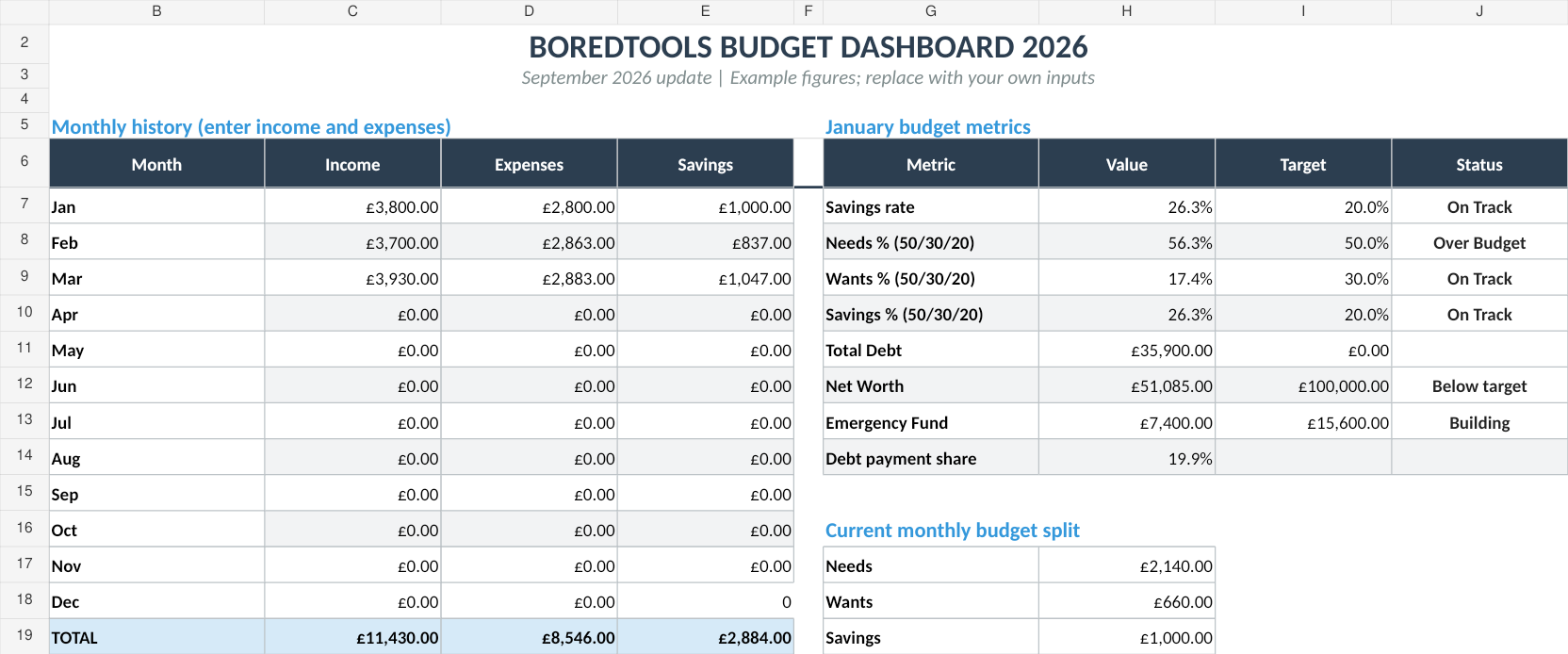
Our Budget Dashboard 2026 (Sort & Keep) isn't teacher-specific out of the box, but its structure makes it straightforward to adapt. It handles multi-category income (useful for teachers with TLR payments, exam marking income, or supply work alongside their main salary), monthly expense tracking with custom categories, and net worth monitoring over time.
UK edition built for British finances. HMRC Self Assessment categories, council tax tracking, National Insurance (Class 2 and Class 4) calculations, ISA allowances, and GBP formatting throughout. US edition included with IRS tax brackets, 401(k) tracking, and USD formatting.
To make it work for teaching, you'd add a "Classroom Expenses" category (tagged for tax relief), set up your pension contribution as a pre-tax deduction, and use the monthly view to create term-time and holiday spending patterns.
Pros:
- Clean, well-built dashboard with visual summaries
- Multi-income tracking for TLR, marking, tutoring, and supply income
- Custom categories make classroom expense tracking easy to add
- Net worth tracking shows your full financial picture, including pension growth
- £7.99 one-time -- roughly 1.7% of the average teacher's annual classroom spending
- Works on mobile via Google Sheets app
Cons:
- Not teacher-specific; requires 20-30 minutes of customisation
- No built-in TPS contribution calculator or pay scale lookup
- Manual data entry (no bank feeds)
- Doesn't auto-switch between term-time and holiday budgets
Verdict: Best value option for teachers who want a professional budget tool without a monthly subscription. The customisation effort is modest, and you end up with a spreadsheet that handles 90% of teacher-specific needs. Pair it with HMRC's tax relief claim form and you've covered the classroom expense angle too.
Budget Template for Teachers: Features to Look For
Whatever approach you choose, here's what separates a useful teacher budget from a generic one:
TPS Pension Contribution Tracker
Your employee contribution rate depends on your salary band. For 2025/26:
| Salary Band | Employee Rate |
|---|---|
| Up to £32,947 | 7.4% |
| £32,948 - £43,945 | 8.6% |
| £43,946 - £51,765 | 9.6% |
| £51,766 - £67,793 | 10.2% |
| £67,794 - £92,697 | 11.3% |
| £92,698+ | 11.7% |
Your budget should model the correct rate and update automatically when you cross a band. When you move from M6 (£43,607) to UPS1 (£45,646), your contribution rate jumps from 8.6% to 9.6%. That 1% jump on a higher salary means your take-home increase is noticeably smaller than the gross pay rise suggests.
Classroom Expense Log for Tax Relief
A simple dated log with columns for item, cost, and category. Keep digital receipts (photos in a Google Drive folder work fine). At the end of the tax year, total it up. If it exceeds £125, claim the actual amount via HMRC's P87 form. If it's under £125, claim the flat-rate deduction anyway. Either way, the log takes 30 seconds per purchase and saves you money every April.
Term-Time vs Holiday Budget Toggle
Build two spending profiles. Term-time includes commuting (£150-400/month depending on distance and mode), work lunches (£80-150/month), union fees (£15-20/month), and daily incidentals. Holiday profile drops those costs but adds childcare (£150-250/week for holiday clubs), travel, and activities. Switching between them each month gives you an accurate picture instead of a blurred average.
Pay Scale Progression Planner
Map out your expected salary for the next 5-10 years. If you're on M3 today, you can project M4 next year, M5 the year after, all the way to UPS3. Factor in estimated national pay awards (2-4% historically) and you've got a surprisingly accurate income forecast. This feeds directly into long-term goals: mortgage affordability, savings targets, when you can afford to drop to part-time.
Supply Teaching Day Rate Calculator
If you do supply work -- either as your main role or to supplement income during a career break -- your daily rate varies significantly. Agencies typically pay £130-180/day, while direct bookings through the school can pay £180-240/day. A calculator that converts your daily rate into equivalent annual salary (accounting for holiday periods where you won't work) helps you compare supply income against permanent positions honestly.
So What Should You Actually Use?
Here's how we'd break it down:
"I just want something free that works." Grab our Free Budget Tracker (Sort & Keep), add a "Classroom Expenses" category, and set your take-home pay (after pension) as the income figure. It won't track your pension or pay scale, but it'll handle month-to-month budgeting reliably.
"I want a proper budget tool without paying monthly." The Budget Dashboard 2026 (Sort & Keep) at £7.99. Spend 20 minutes adding your TPS contribution rate, a classroom expense category, and term-time/holiday spending profiles. You'll end up with a more complete financial picture than most of the £10/month apps provide.
"I need to get my debt under control first." Start with our debt payoff calculator to build a repayment plan, then layer a budget template on top once you know how much you're allocating to debt each month.
"I want automatic tracking and don't care about pension or tax relief." YNAB or Emma. Accept the limitations and enjoy the convenience.
"I'm not sure which budgeting method suits me." Read our best budget spreadsheet templates for 2026 roundup first. It covers the main approaches and helps you pick a method before committing to a tool.
The Bottom Line
Teaching is one of the few professions where your pay scale is public, your pension is excellent, and your out-of-pocket work expenses are both real and claimable. A generic budget template ignores all three. It doesn't know that your commuting costs disappear for six weeks in summer. It doesn't know that your pension contribution rate changes when you cross a salary band. It doesn't know that the £468 you spend on glue sticks, whiteboard markers, and exercise books is tax-deductible.
The right budget template for teachers doesn't need to be complicated. It needs to do four things: track your actual take-home pay after TPS contributions, separate term-time and holiday spending, log classroom expenses for tax relief, and show you where your salary is going on a scale that progresses slowly but predictably.
Whether you build it yourself, use our Budget Dashboard 2026 (Sort & Keep), or adapt a free template, the framework matters more than the tool. But a tool that already handles multi-category tracking, monthly expense logging, and visual dashboards means you spend 10 minutes a week on your budget instead of losing an entire Sunday to spreadsheet formatting. And after a week of teaching, the last thing you need is more unpaid admin.
Related Reads
- Budget Template for Military Families: Deployments, Allowances & Frequent Moves
- Budget Template for Remote Workers: Home Office Costs & Tax Relief
- Budget Template for Small Business Owners
- Best Budget Spreadsheet Templates in 2026
Get free spreadsheet templates and updates. New templates, feature updates, and practical guides delivered to your inbox. No spam, unsubscribe anytime.
Subscribe free → | Already have a template? Download the free budget tracker or free meal planner. No email required.
Choose the right next step
Need a simple budget tracker spreadsheet? Start with the Free Budget Tracker. Use Budget Dashboard 2026 when you want budgets, debt, savings and net worth in one workbook. Choose the Complete Collection when several parts of life admin need sorting.