Best Freelance Finance Spreadsheets: Templates That Work
Freelance finance spreadsheets compared for 2026. Free templates, paid tools, and accounting software with honest reviews. Find the right fit.

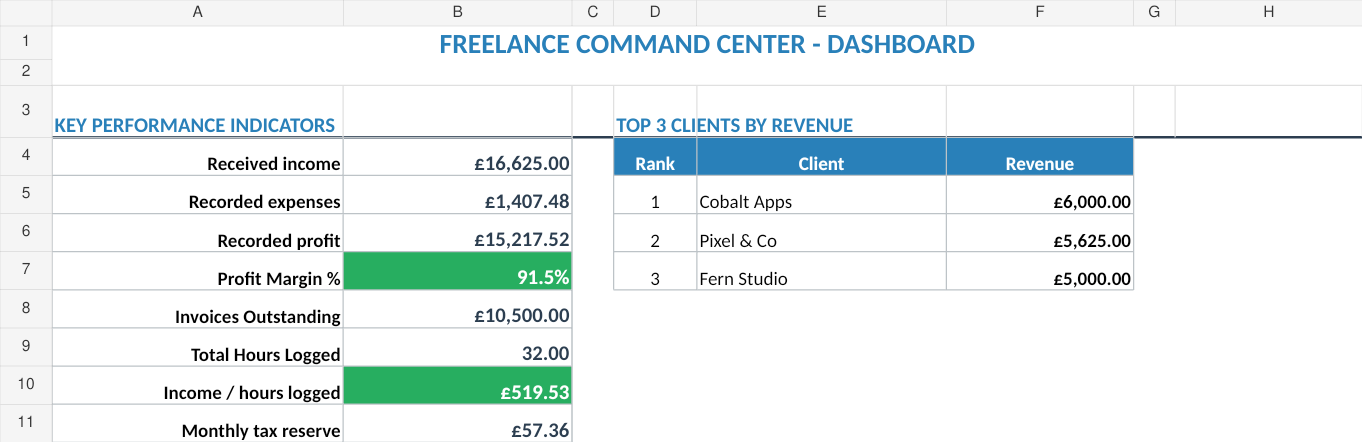
From Sort & Keep, the maker of the linked templates. Our current product prices update with your selected currency. Worked examples and third-party prices keep their stated currency and date.
There are roughly 2.2 million freelancers in the UK right now. Most of them are managing their finances with some combination of bank statements, a half-finished Google Sheet, and a carrier bag of receipts they swear they'll sort before January. If you've ever searched for a freelance finance spreadsheet and been overwhelmed by the options, you're not alone. Free templates, paid trackers, full accounting software. We've tested the lot. Here's what actually works.
The short version: if you want a spreadsheet that tracks income, expenses, clients, invoices, and profit in one place, the Sort & Keep Freelance Command Center is the one we'd buy first. It's £14.39 one-time on Payhip. No subscription, no data lock-in, works offline. Get it on Sort & Keep →
The self-assessment deadline waits for no one. Whether you're a graphic designer in Bristol billing three clients or a copywriter in Edinburgh juggling ten, the tool you use to track money in and money out will either save you hours or cost them. We're going to be specific: real prices, real limitations, honest verdicts.
What a Good Freelance Finance Spreadsheet Actually Needs
Before we compare anything, let's set the baseline. A spreadsheet that just logs income and expenses is a glorified notebook. For freelance work in the UK, you need these five things at minimum:
1. Income Tracking by Client
You need to see what each client pays you, when, and how often. Not just total revenue. Per-client revenue over time. That's how you spot which relationships are profitable and which are eating your hours for pennies.
2. Expense Categorisation for Self-Assessment
HMRC wants expenses sorted into specific categories: office costs, travel, clothing, stock, legal and financial costs, marketing, and so on. If your spreadsheet dumps everything into one column, you're doing the categorisation work twice. Once when you enter it, and again in January when you're filling in your tax return.
3. Tax Set-Aside Calculator
The number one financial shock for new freelancers: the tax bill. If you're earning over the £12,570 personal allowance, you owe Income Tax. Over £12,570 in profit, you owe Class 4 National Insurance at 6% (2025/26 rates). A proper tracker calculates your estimated liability in real time so you can set aside the right percentage from every payment.
4. Invoice Management
Who owes you money? How long have they owed it? Which invoices are overdue? If you can't answer those questions in under 30 seconds, your system isn't working. Late payment is endemic in freelancing. A 2024 IPSE survey found 29% of freelancers regularly wait more than 30 days past terms to get paid.
5. Profit Margin Analysis
Revenue is vanity. Profit is sanity. If you earned £45,000 but spent £18,000 on software subscriptions, coworking space, equipment, and travel, your actual income is £27,000. A good tracker shows you this number without manual calculation every month.
The Best Options for Freelancers in 2026
Twelve months of income across six clients, recurring and variable expenses, quarterly tax estimates. Here are the main considerations.
#1: Sort & Keep Freelance Command Center
Platform: Google Sheets / Excel
Price: £14.39 one-time
Best for: Freelancers who want spreadsheet flexibility with built-in business intelligence
Full disclosure: this is our product. We built it because we couldn't find a freelance finance spreadsheet that combined financial tracking with client management and profitability analysis. It's at the top of this list because it solves the problem most freelancers actually have: knowing which clients are worth their time and whether the business is growing or shrinking.
Every Sort & Keep freelance template ships in two editions. The UK edition uses HMRC Self Assessment, National Insurance, and simplified expenses. The US edition uses IRS Schedule C, quarterly estimates, and SE tax. Not just a currency swap. Separate tax systems built from scratch.
What it does well:
- One-time £14.39. No subscription, yours forever, works offline
- Client CRM pipeline with lead, proposal, active, complete, and paid stages in one view
- Time tracking with automatic effective hourly rate calculation per client
- Invoice tracker with aging buckets (current, 30-day, 60-day, 90+ day) and late payer flagging
- Tax estimation calculator with Schedule C mapping. UK self-assessment categories on the roadmap
- Profit and loss statement with monthly columns
- Client profitability ranking. See which clients are actually worth your time
- All formulas protected so you can't accidentally break anything
- No bank connection required. You own your data completely
Where it falls short:
- Manual data entry. No automatic bank feed imports
- Tax calculator is currently US-focused. UK self-assessment categories are on the roadmap
- No HMRC integration or MTD compliance
- No receipt scanning
- Requires basic spreadsheet literacy
Verdict: This is the one if you want to understand your business, not just your books. The client profitability ranking and effective hourly rate calculations are things none of the accounting software tools do well. At £14.39 one-time versus £72 to £234/year for subscription software, the economics are hard to argue with. Especially if your finances are simple enough that you don't need MTD compliance.
Want more detail on what's inside? Read the full Freelance Command Center breakdown.
Get the Freelance Command Center on Sort & Keep for £14.99 →
2. Free Google Sheets Templates
Platform: Google Sheets (browser)
Price: Free
Best for: Absolute beginners who just need something now
There are hundreds of free freelance finance templates on Google Sheets. The better ones typically include an income log, expense log, and a summary dashboard. Quality varies wildly.
What they do well:
- Completely free
- Familiar interface if you already use Google Workspace
- Easy to customise. Add columns, change categories, build your own formulas
Where they fall short:
- No tax calculation built in
- No invoice tracking in most templates
- Quality varies wildly. Some templates have broken formulas or outdated tax rates
- No formula protection, so one wrong keystroke can break the whole sheet
Verdict: Fine for month one of freelancing. You'll outgrow it by month three.
3. FreeAgent
Platform: Web app and mobile
Price: £19.50/month (£14.50/month if you bank with NatWest, Royal Bank of Scotland, or Ulster Bank)
Best for: UK freelancers who want MTD-compliant accounting without hiring an accountant
FreeAgent is the gold standard for UK self-employed accounting. It's not a spreadsheet. It's full accounting software. But it's where many freelancers end up, so it belongs in this comparison.
What it does well:
- Automatic bank feed imports from most UK banks
- Self-assessment tax return filing directly to HMRC
- Making Tax Digital (MTD) compliant for VAT
- Invoice creation and automatic payment reminders
- Mileage tracking, project tracking, time tracking built in
Where it falls short:
- £19.50/month adds up to £234/year. Significant if you're earning under £30,000
- Overkill if you have 2-3 clients and straightforward expenses
- Steeper learning curve than a spreadsheet
- Exporting data is possible but not smooth
Verdict: If you're VAT-registered or approaching the £90,000 VAT threshold, FreeAgent is hard to beat. The HMRC integration alone is worth the subscription. But if your finances are straightforward and you're nowhere near VAT registration, you're paying for features you don't need.
4. Xero
Platform: Web app and mobile
Price: From £15/month (Starter plan, limited to 20 invoices/month)
Best for: Freelancers who also run a limited company or have complex invoicing needs
Xero is FreeAgent's main competitor in the UK market. It's slightly more business-focused and less freelancer-focused, which cuts both ways.
What it does well:
- Excellent invoicing. Professional templates, automatic reminders, online payment links
- Bank reconciliation is fast and accurate
- Large library of integrations (Stripe, PayPal, Shopify, 1,000+ apps)
- Strong reporting. P&L, balance sheet, aged receivables
Where it falls short:
- The £15/month Starter plan caps you at 20 invoices and 5 bills per month. Most active freelancers will need the £30/month Standard plan
- Interface is powerful but cluttered. Designed for accountants, not freelancers
- Self-assessment filing requires a third-party integration or your accountant
- No built-in time tracking
Verdict: Better than FreeAgent if you're running a limited company. Worse than FreeAgent if you're a sole trader filing self-assessment. The invoice cap on the Starter plan is the dealbreaker for most freelancers. You'll almost certainly end up on the £30/month tier, which is £360/year.
5. QuickBooks Self-Employed
Platform: Web app and mobile
Price: £6/month (Self-Employed plan)
Best for: Budget-conscious freelancers who want more than a spreadsheet but less than full accounting software
QuickBooks Self-Employed sits in the middle ground between a spreadsheet and proper accounting software. It's the cheapest subscription option that still does useful things automatically.
What it does well:
- £6/month is genuinely affordable
- Automatic expense categorisation from bank feeds
- Mileage tracking via mobile GPS
- Separates personal and business expenses
- Quarterly tax estimate updates
- Receipt capture works well
Where it falls short:
- Limited invoicing. You can create invoices but the templates are basic
- Reporting is thin compared to FreeAgent or Xero
- The Self-Employed plan is separate from the main QuickBooks product, so upgrading later means migrating data
Verdict: The best value subscription option for freelancers earning under £50,000 with simple needs. The automatic bank categorisation saves genuine time. But if you need client-by-client analysis or professional invoicing, it falls short.
6. Wave
Platform: Web app
Price: Free (revenue from payment processing at 1% + 20p per transaction)
Best for: Freelancers who want accounting software features at zero cost
Wave was acquired by H&R Block in 2019 and has remained free for invoicing and accounting. They make money when your clients pay through Wave's payment processing.
What it does well:
- Genuinely free. Unlimited invoicing, expense tracking, financial reporting
- Bank connections for automatic transaction import
- Professional invoice templates
- Receipt scanning via mobile app
- Dashboard gives a clear financial overview
Where it falls short:
- UK support is limited. Wave is Canadian/US-focused, so some tax features don't translate
- No MTD compliance for VAT
- No self-assessment integration with HMRC
- Payment processing fees eat into margins if clients pay through Wave
- No project tracking or time tracking
Verdict: The best free option if you're comfortable handling HMRC compliance separately. The invoicing is genuinely good. But the UK-specific tax gaps mean you'll still need another tool or an accountant for self-assessment.
7. Build Your Own (DIY Spreadsheet)
Platform: Google Sheets / Excel / LibreOffice Calc
Price: Free (plus your time)
Best for: Freelancers who enjoy building systems and want total control
The classic approach. Open a blank spreadsheet, create tabs for income, expenses, invoices, and a dashboard. Build your own formulas. Customise everything.
What it does well:
- Completely free
- Total control over structure, categories, formulas, and layout
- You understand every formula because you wrote it
- Can be tailored precisely to your business and tax situation
Where it falls short:
- Time investment is significant. Expect 8 to 15 hours to build something solid
- Formula errors are common and can silently corrupt your data
- You're maintaining it forever. Tax rates change, your business evolves, things break
- No support when something goes wrong
Verdict: Viable if you're genuinely good at spreadsheets and enjoy the process. The hidden cost is your time. If you bill at £50/hour and spend 10 hours building a tracker, that's £500 in opportunity cost for something you could have bought for £6 to £15.
Comparison Table
| Tool | Price | Type | Bank Feeds | Tax Calc | Invoicing | Client Tracking | MTD/HMRC |
|---|---|---|---|---|---|---|---|
| Freelance Command Center | £14.39 once | Spreadsheet | No | Yes (US, UK soon) | Tracker | Yes | No |
| Free Google Sheets | Free | Spreadsheet | No | No | No | No | No |
| FreeAgent | £19.50/mo | Software | Yes | Yes | Yes | Basic | Yes |
| Xero | £15-30/mo | Software | Yes | Partial | Yes | No | Yes |
| QuickBooks SE | £6/mo | Software | Yes | Yes | Basic | No | No |
| Wave | Free | Software | Yes | No (UK) | Yes | No | No |
| DIY Spreadsheet | Free | Spreadsheet | No | DIY | DIY | DIY | No |
Freelance Finance Spreadsheet vs Accounting Software
This is the real question most freelancers are trying to answer, and the honest answer depends on one number: how close you are to the VAT threshold.
When a Spreadsheet Is Enough
A spreadsheet is sufficient when:
- You're a sole trader earning under £85,000 (well below the £90,000 VAT threshold)
- You have fewer than 20 clients per year and can track invoices manually
- Your expenses are straightforward. Software subscriptions, home office, maybe some travel
- You file self-assessment once a year and don't need quarterly VAT returns
- You want to understand your numbers, not just report them. Spreadsheets force you to engage with every transaction
Most freelancers earning between £20,000 and £60,000 with 3 to 10 regular clients fall squarely into "spreadsheet is enough" territory. The manual entry that feels like a burden is actually a feature. You notice patterns, catch duplicate charges, and build financial intuition that auto-import tools don't give you.
If you're in that range and want a proper setup, read our guide to the Freelance Command Center and our tax deduction tracker for capturing every allowable expense.
When You Need Proper Accounting Software
The tipping point is almost always VAT:
- You've crossed or are approaching the £90,000 VAT threshold. MTD for VAT requires digital record-keeping with compatible software. A spreadsheet no longer meets HMRC's requirements.
- You're filing VAT returns quarterly. The compliance overhead makes automation worth it
- You have 50+ invoices per month. Manual tracking becomes a part-time job
- You're running a limited company. Corporation tax, director's loan accounts, and dividend tracking go beyond what a spreadsheet handles cleanly
- You have employees or subcontractors. PAYE, pension auto-enrolment, and CIS deductions need proper software
If you're at £40,000 and growing 30% year over year, start looking at FreeAgent or Xero now. Migration is easier when you have twelve months of clean data rather than three years of messy spreadsheets.
The Middle Ground
Here's what we actually recommend for most freelancers: use a spreadsheet for business intelligence and accounting software for compliance. They solve different problems.
A freelance finance spreadsheet tells you which clients are profitable, whether your effective hourly rate is going up or down, and how your income is trending month over month. Accounting software tells HMRC what you owe and keeps you compliant. They're not mutually exclusive.
Run the Freelance Command Center alongside QuickBooks Self-Employed, and you spend £6/month on compliance plus £14.39 once on business intelligence. That's less than two months of FreeAgent for a setup that gives you more insight into your actual business performance.
Our Recommendation
If you're just starting out and earning under £30,000, grab a free Google Sheets template. Get into the habit of tracking everything first. Don't spend money on tools until the habit's established.
If you're earning £30,000 to £85,000 and want genuine visibility into your business, not just tax compliance, the Freelance Command Center at £14.39 one-time gives you client profitability analysis and financial tracking that subscription software charges £150 to £250/year to approximate. Pair it with QuickBooks Self-Employed at £6/month if you want automatic bank feeds.
If you're VAT-registered or approaching the threshold, go with FreeAgent (especially if your bank covers the cost) or Xero. The MTD compliance is non-negotiable, and the automation saves real time when you're processing dozens of transactions weekly.
If you want free accounting software and don't mind handling HMRC separately, Wave is genuinely good for invoicing and basic tracking.
Skip the DIY route unless building spreadsheets is something you actively enjoy. Your time is better spent on billable work. The right tool is the one you'll actually use every week. A perfect system you abandon in February is worse than a basic spreadsheet you update every Friday.
Also worth checking: our Business Essentials Bundle if you want a full set of freelance templates in one go.
Grab the Freelance Command Center for £14.99 on Sort & Keep →
Related Reads
- Freelance Command Center: Client CRM, Time Tracking, Invoices & Tax Estimator
- Tax Deduction Tracker Spreadsheet
- Business Essentials Bundle
- Freelance Tax Calculator UK: Estimate Your Self-Assessment Bill
- How to Track Freelance Income and Expenses
Get free spreadsheet templates and updates. New templates, feature updates, and practical guides delivered to your inbox. No spam, unsubscribe anytime.
Subscribe free → | Already have a template? Download the free budget tracker. No email required.
Choose the right next step
Use the Freelance Command Center for a freelance income and invoice tracker spreadsheet. Use the Rental Property Portfolio Tracker for rent, expense, deal and ROI tracking. The Business Essentials Bundle combines both workbooks.