How to Track Freelance Income and Expenses in Google Sheets
Freelance income and expense tracking in Google Sheets. HMRC categories, templates, and quarterly check-ins included. Get the template.

From Sort & Keep, the maker of the linked templates. Our current product prices update with your selected currency. Worked examples and third-party prices keep their stated currency and date.
HMRC does not care that you are a creative. It does not care that your best ideas come at 2am and that spreadsheets make your eyes glaze over. If you freelance in the UK. Even as a side hustle. You are legally required to keep records of every pound earned and every pound spent on the business. And we need to be honest with you: the "I'll sort it at tax time" approach is not a strategy. It is a guaranteed way to track freelance income and expenses badly, miss deductions you were entitled to, and hand your accountant a mess that costs £500 to £1,000 in catch-up fees on top of what you already owe. We have seen it happen to friends, clients, and ourselves before we got serious about this.
The good news: you do not need expensive software. A well-structured Google Sheet handles everything HMRC requires, costs nothing, and takes less than 15 minutes a week to maintain.
What HMRC Actually Requires From You
Self Assessment is not optional once you earn more than £1,000 from self-employment in a tax year. Here is what HMRC expects you to keep:
Income records. Every payment received, from whom, when, and for what. If you invoice, keep copies of every invoice. If you receive payments through PayPal, Stripe, or bank transfer, the transaction records count. But only if you can match them to specific work.
Expense receipts. Every business expense needs a receipt or proof of purchase. Digital copies are fine. HMRC accepts photos of paper receipts stored electronically, as long as they are legible and show the date, amount, and what was purchased.
Mileage logs. If you claim business mileage (45p per mile for the first 10,000 miles, 25p after that), you need a log showing the date, destination, purpose, and miles driven. "Roughly 200 miles a month" does not cut it.
Bank statements. Keep them for at least five years after the 31 January submission deadline for that tax year. If you file your 2025/26 return by 31 January 2027, you need those statements until at least 31 January 2032.
The penalty for incomplete records is up to £3,000. That is not a typo. HMRC can levy this fine independently of any tax you owe. And in a compliance check, "I didn't know I needed to keep that" is not a defence. HMRC opened over 300,000 compliance checks in 2024/25. The odds of being checked in any given year are low, but over a 10-year freelance career, they are not negligible. And when a check does come, it typically covers the previous four years. So poor records from 2023 can still bite you in 2027.
How to Track Freelance Income and Expenses: Google Sheets Setup
We are going to build four tabs: Income Log, Expense Log, Monthly P&L, and Tax Estimate. This takes about 30 minutes to set up. After that, maintaining it takes 10-15 minutes per week.
Tab 1: Income Log
Create these columns:
| Date | Client | Description | Amount (£) | Invoice # | Date Sent | Date Paid | Payment Method |
|---|
Date is when you did the work or issued the invoice. Date Paid is when the money actually hit your account. This distinction matters because HMRC uses the cash basis by default for small businesses. You report income when received, not when invoiced.
Add data validation to the Payment Method column (Data > Data validation > List of items): Bank Transfer, PayPal, Stripe, Cash, Cheque, Other.
At the bottom of the Amount column, add a running total: =SUM(D2:D). Below that, add a count of unpaid invoices: =COUNTBLANK(G2:G). This counts rows where Date Paid is empty. When that number is above zero, you have money outstanding.
Tab 2: Expense Log
| Date | Category | Description | Amount (£) | Receipt Ref | Payment Method | Allowable? |
|---|
The Category column should use data validation with the 12 HMRC allowable expense categories (we cover these in the next section). Receipt Ref is your filing system. We use the format 2026-03-14-AMZN-001 (date-vendor-sequence). Save the actual receipt as a photo or PDF in a Google Drive folder with the same name.
The Allowable? column is a checkbox. Not every expense is 100% allowable. Your phone bill, for example, is only deductible for the business-use percentage. Mark partial expenses and note the percentage in the Description column.
Running total at the bottom: =SUM(D2:D) for total spend, and =SUMIF(G2:G, TRUE, D2:D) for total allowable expenses.
Tab 3: Monthly P&L
This tab auto-calculates from the first two. Create 12 monthly columns plus an annual total. Three rows:
- Gross Income:
=SUMIFS('Income Log'!D:D, 'Income Log'!G:G, ">="&DATE(2026,1,1), 'Income Log'!G:G, "<"&DATE(2026,2,1)). Filtering by Date Paid, adjusted for each month - Total Expenses: Same SUMIFS logic against the Expense Log, filtered by date
- Net Profit: Gross Income minus Total Expenses
Conditional formatting: green for months where net profit exceeds £1,000, yellow for £0-£1,000, red for negative months. This gives you an instant visual read on how the year is going.
Tab 4: Tax Estimate
This is the tab that prevents January panic. Three key calculations:
- National Insurance (Class 2): £3.45 per week if profits exceed £12,570 (2025/26 rates). Annual cost: roughly £179.
- National Insurance (Class 4): 6% on profits between £12,570 and £50,270. 2% on profits above £50,270.
- Income Tax: 20% on profits between £12,570 and £50,270 (basic rate). 40% on £50,270 to £125,140 (higher rate). 45% above £125,140 (additional rate).
Use a simple formula that pulls net profit from the P&L tab and calculates the estimated liability. If you earn £35,000 net profit, your rough tax bill is:
- Class 2 NI: £179
- Class 4 NI: (£35,000 - £12,570) x 6% = £1,345.80
- Income Tax: (£35,000 - £12,570) x 20% = £4,486
- Total estimated: £6,010.80
Having this number update in real time, month by month, means no surprises. Set aside that money each month into a separate savings account. We use a standing order that moves 30% of every client payment into a "tax pot" account the day it arrives. That percentage is deliberately high. It is better to have a surplus at tax time than a shortfall. Any excess becomes your Q1 buffer for the next year.
A common mistake: forgetting that your first Self Assessment payment includes the tax owed for the year plus a "payment on account". An advance payment towards next year's bill. This means your first January bill can be roughly 150% of what you expected. The Tax Estimate tab should model this so it does not blindside you.
The 12 Allowable Expense Categories for Self-Assessment
These are the categories HMRC recognises for sole traders. Use these as your data validation list in the Expense Log:
- Office costs. Stationery, printer ink, postage, phone bills (business portion). If you work from home, you can claim £6/week (£312/year) without receipts under the simplified expenses method, or calculate the actual proportion of household costs used for business.
- Travel. Train tickets, bus fares, taxi fares, hotel stays for business trips. Not your daily commute. That is never deductible, even if you commute to a client site you visit regularly.
- Clothing. Only uniforms or protective clothing required specifically for work. A freelance designer cannot claim a new outfit for a client meeting. A freelance electrician can claim steel-toe boots.
- Staff costs. Salaries, subcontractor payments, employer NI contributions. If you hire a virtual assistant or subcontract work, it goes here.
- Stock and materials. Raw materials, goods purchased for resale, direct project costs.
- Financial costs. Bank charges, credit card interest (business accounts only), hire purchase interest, insurance premiums.
- Business premises. Rent, rates, power, water for business premises. Not applicable if you work from home. Use the Office costs simplified expenses method instead.
- Advertising and marketing. Website hosting, domain names, Google Ads, social media promotion, business cards, portfolio hosting.
- Professional fees. Accountant fees, tax adviser fees, professional body membership, trade publications.
- Phone, internet, and software. Monthly phone contract (business portion), broadband (business portion), software subscriptions directly used for work. Adobe Creative Cloud, GitHub, project management tools.
- Training and development. Courses and qualifications that maintain or update existing skills. A web developer taking an advanced JavaScript course is allowable. A web developer taking a cookery course is not.
- Legal and professional. Solicitor fees, debt recovery costs, patent or trademark costs, professional indemnity insurance.
Keep this list taped to your monitor (figuratively). When you spend money on the business, categorise it immediately. Do not let receipts pile up.
Two categories cause the most confusion:
Home office costs. You have two options. The simplified expenses method lets you claim a flat rate based on hours worked from home: £10/month for 25-50 hours, £18/month for 51-100 hours, £26/month for 101+ hours. Alternatively, calculate the actual proportion. If your office is one room in a four-room house and you use it 40 hours a week, you can claim roughly 25% of household bills (rent, utilities, broadband, council tax) proportional to business use. The actual method typically yields a higher deduction but requires more record-keeping.
Mixed-use expenses. Your phone bill, broadband, and car costs are rarely 100% business. HMRC expects a reasonable apportionment. If you use your phone 60% for business, claim 60%. Keep a note of how you arrived at that percentage. A week-long usage log once a year is usually sufficient evidence.
Five Ways to Track Freelance Income and Expenses: Compared
We have tested spreadsheets, apps, and hybrid setups. Here is what we found.
1. DIY Google Sheet (the setup above)
Platform: Google Sheets (free)
Price: £0
Pros: Completely customisable. No subscription. You own your data. Works offline with the Google Sheets app. Shareable with your accountant via a link.
Cons: You build and maintain it yourself. Formulas can break if you accidentally edit a protected cell. No automatic bank feed imports. No receipt scanning.
Verdict: Perfect if you are comfortable with spreadsheets and have fewer than 50 transactions per month. The setup we described above handles everything HMRC needs. But it requires discipline. The spreadsheet only works if you actually use it weekly.
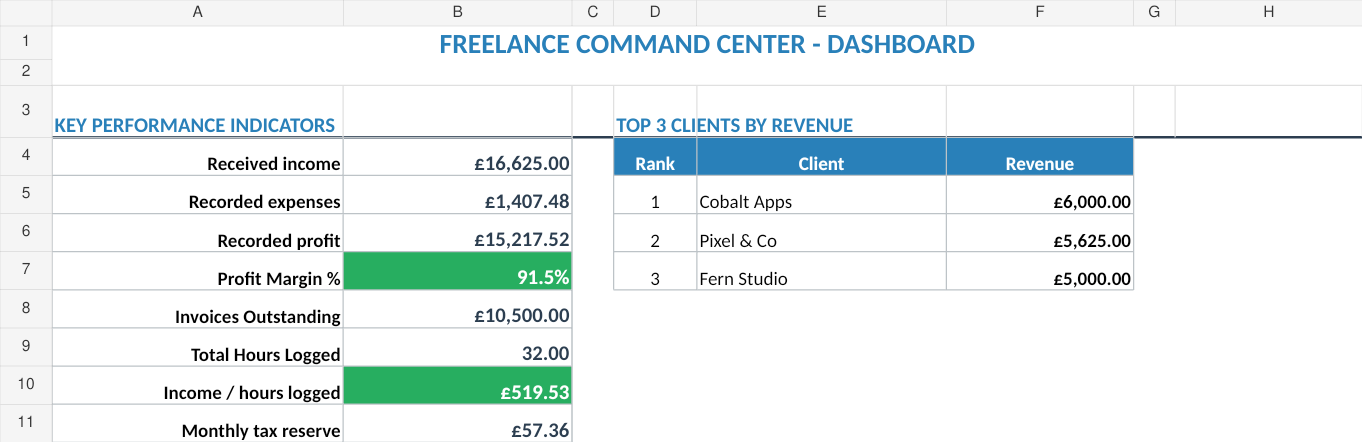
2. Freelance Command Center
Platform: Google Sheets / Excel
Price: £14.99 (one-time). Get it here (Sort & Keep)
UK edition uses HMRC categories, Self Assessment tax bands, National Insurance calculations, and GBP formatting. US edition uses IRS categories, Schedule C, quarterly estimated taxes, and USD formatting. Both editions include client CRM, time tracking, and invoice generation.
Pros: Pre-built with client CRM, time tracking, invoice aging, tax estimation, and profitability analysis. All formulas protected so you cannot accidentally break them. Designed specifically for freelancers, not generic small businesses. Includes a late payer watchlist that flags chronically late clients.
Cons: US tax estimation by default (Schedule C and quarterly estimated taxes). UK freelancers will need to adjust the tax tab to use HMRC rates. No automatic bank imports.
Verdict: The best option if you want a spreadsheet that does more than track income and expenses. The client profitability ranking alone. Which shows your effective hourly rate per client. Is worth the price. We built this after three years of freelancing with disconnected tools and wish we had it from day one.
3. Free Budget Tracker
Platform: Google Sheets / Excel
Price: Free. Download here (Sort & Keep)
Pros: Zero cost. Clean layout. Handles income and expense tracking with monthly breakdowns. Good entry point for freelancers who are just starting and have simple finances.
Cons: No client management, no invoice tracking, no tax estimation. It is a budget tracker, not a business management tool. You will outgrow it within 6-12 months if your freelance work scales. See the full review for more detail.
Verdict: Start here if you are earning under £10,000 from freelance work and have fewer than five clients. Graduate to something more capable when you start dealing with multiple income streams and quarterly tax payments.
4. FreeAgent
Platform: Web app + mobile app
Price: £14.50/month (£174/year)
Pros: Built specifically for UK freelancers and small businesses. Automatic bank feeds. Receipt scanning with OCR. MTD-compatible VAT returns. Self Assessment filing built in. HMRC-recognised.
Cons: Recurring cost adds up. £174/year is real money when you are starting out. Overkill if you are below the VAT threshold and have simple finances. The interface has a learning curve. You are locked into their space.
Verdict: The right choice once you are earning above £30,000 consistently, are VAT-registered, or want fully automated bookkeeping. If you are below those thresholds, a spreadsheet does the same job for free.
5. Xero
Platform: Web app + mobile app
Price: From £15/month (Starter plan, 20 invoices/month)
Pros: Industry-standard accounting software. Your accountant almost certainly uses Xero or wants you to. Bank feeds, invoicing, payroll, multi-currency support. MTD-compatible.
Cons: £180/year minimum. The Starter plan limits you to 20 invoices per month. If you invoice weekly to four clients, you are already at the limit. The interface is designed for accountants, not freelancers. Feature overload for a sole trader.
Verdict: Makes sense if your accountant requires it or if you are growing beyond sole trader into a limited company. For pure freelance tracking, it is more than you need and the monthly cost is hard to justify under £50,000 revenue.
For a broader comparison of spreadsheet-based options, see our roundup of the best freelance finance spreadsheets for 2026.
The Quarterly Check-In: 15 Minutes That Save Hours
We do this on the first Sunday of January, April, July, and October. It takes 15 minutes and prevents every tax-time horror story we have ever heard.
Step 1 (3 minutes): Reconcile income. Open your bank statement for the quarter. Cross-reference every deposit against your Income Log. Flag anything missing. If a payment came in that you did not log, add it now. If an invoice shows as paid in your log but the money never arrived, investigate.
Step 2 (3 minutes): Reconcile expenses. Same process. Every business transaction on your bank statement should have a matching entry in the Expense Log. The most commonly missed expenses: software subscriptions that auto-renew, small Amazon purchases for office supplies, and mileage from client site visits.
Step 3 (3 minutes): Check receipt coverage. Every expense entry needs a receipt reference. Sort the Expense Log by Receipt Ref and look for blanks. For anything missing, track down the receipt now. Email confirmations, Amazon order history, or the shoebox in the cupboard. After 90 days, receipts become significantly harder to recover.
Step 4 (3 minutes): Review the P&L. Look at the monthly P&L tab. Are you on track for the year? Any month where expenses spiked unexpectedly? Any month where income dropped and you did not notice? This is your early warning system.
Step 5 (3 minutes): Update the tax estimate. With clean data for the quarter, your Tax Estimate tab should now show an accurate projection. Compare the estimated liability against what you have actually set aside. If there is a shortfall, adjust your monthly savings immediately. Do not wait until January to discover you are £2,000 short.
That is it. Fifteen minutes, four times a year. Put it in your calendar as a recurring event with a 30-minute block. You will finish early every time, but the calendar hold prevents it from getting pushed.
The alternative is six hours of panic in January, an accountant charging you £150/hour to untangle your records, and the nagging anxiety of not knowing where you stand financially. We have been on both sides. The quarterly check-in version of freelancing is dramatically less stressful.
The Bottom Line
Tracking freelance income and expenses is not complicated. It is tedious. And tedious things only get done when the system is simple enough to use consistently.
If you are just starting out or earning under £10,000 from freelance work, the DIY Google Sheet setup above or our Free Budget Tracker (Sort & Keep) will handle everything you need. Build the four tabs, spend 10 minutes a week logging transactions, and do the quarterly check-in. You will be ahead of 80% of freelancers who are still stuffing receipts in a drawer.
If you are earning more, juggling multiple clients, and need visibility into which clients are actually profitable, the Freelance Command Center (Sort & Keep) (£14.99, one-time) combines income tracking, expense logging, client management, and tax estimation in one sheet. It is what we use to run our own freelance work.
And if you are above £30,000 and VAT-registered, graduate to FreeAgent or Xero and let the automation handle bank feeds and MTD compliance. You have earned the right to pay for convenience at that point.
Whatever you choose, start this week. Not at tax time. Not "when things calm down." Open a spreadsheet, log last week's income and expenses, and set a 15-minute weekly reminder. Every Sunday evening, before the week starts, spend 10 minutes entering the previous week's transactions. It becomes a habit within a month.
Future you. The one who is not panicking on 30 January, who hands the accountant a clean spreadsheet instead of a carrier bag of receipts, and who actually knows their net profit to the penny. Will be grateful.
Related Reads
- Freelance Command Center: Client CRM, Time Tracking, Invoices & Tax Estimator
- Freelance Tax Calculator UK: Estimate Your Self-Assessment Bill
- Tax Deduction Tracker Spreadsheet
- Best Freelance Finance Spreadsheets in 2026
Get free spreadsheet templates and updates. New templates, feature updates, and practical guides delivered to your inbox. No spam, unsubscribe anytime.
Subscribe free → | Already have a template? Download the free budget tracker or free meal planner. No email required.
Choose the right next step
Use the Freelance Command Center for a freelance income and invoice tracker spreadsheet. Use the Rental Property Portfolio Tracker for rent, expense, deal and ROI tracking. The Business Essentials Bundle combines both workbooks.